



Introduction
Last updated: August 2026
In today’s data-driven world, efficiently moving data from local sources to cloud data warehouses is a critical operation for businesses of all sizes. Whether you’re dealing with daily exports, customer data, or analytical datasets, the process of loading CSV files into Snowflake should be straightforward and reliable. However, traditional approaches often involve complex setup processes and multiple tools. This is where Sling comes in - a modern data movement and transformation platform that simplifies this entire workflow.
Traditional Data Pipeline Challenges
Setting up a data pipeline from local CSV files to Snowflake traditionally involves several complex steps and considerations:
- Writing custom scripts to handle CSV parsing and data type mapping
- Managing Snowflake credentials and connection security
- Implementing error handling and retry mechanisms
- Setting up infrastructure for scheduled loads
- Maintaining code as requirements change
- Dealing with data type mismatches and transformations
These challenges often lead to brittle solutions that require significant maintenance effort. Common approaches might involve using Python scripts with libraries like pandas and snowflake-connector-python, or commercial ETL tools that come with hefty price tags and steep learning curves.
For example, a typical Python-based solution might require:
- Setting up a Python environment
- Installing and managing multiple dependencies
- Writing code for CSV parsing and validation
- Implementing Snowflake connection handling
- Building error handling and logging
- Creating a scheduling mechanism
Enter Sling: A Modern Solution
Sling revolutionizes this process by providing a streamlined, efficient approach to data movement. Instead of dealing with multiple components and complex code, Sling offers:
- Direct CSV to Snowflake synchronization
- Automatic data type mapping
- Built-in error handling and retries
- Simple configuration-based setup
- Both CLI and UI-based interfaces
- Robust monitoring and logging
With Sling, what previously required hundreds of lines of code and multiple dependencies can be accomplished with a simple configuration or even a single command.
Getting Started with Sling
Let’s begin by installing Sling on your system. Sling provides multiple installation options to suit your environment:
# macOS / Linux
curl -fsSL https://slingdata.io/install.sh | bash

# Windows
irm https://slingdata.io/install.ps1 | iex

# Python
pip install sling
After installation, verify that Sling is properly installed by checking its version:
# Check Sling version
sling --version
Setting Up Connections
Before we can start moving data, we need to configure our source (local CSV) and target (Snowflake) connections. Sling provides multiple ways to manage connections:
Using the CLI
Sling provides a convenient command-line interface for managing connections:
# Set up Snowflake connection
sling conns set snowflake_target \
  type='snowflake' \
  account='your_account' \
  user='your_username' \
  password='your_password' \
  database='your_database' \
  warehouse='your_warehouse'
Using YAML Configuration
For more complex setups or when managing multiple connections, you can use a YAML configuration file (~/.sling/env.yaml):
connections:
  snowflake_target:
    type: snowflake
    account: your_account
    user: your_username
    password: your_password
    database: your_database
    warehouse: your_warehouse
    role: your_role  # optional
    schema: your_schema  # optional
The local file source doesn’t require explicit configuration as Sling automatically handles local file access.
Data Synchronization Methods
Sling offers two primary methods for synchronizing data: using CLI flags for quick operations and using YAML configuration files for more complex scenarios.
Using CLI Flags
The CLI approach is perfect for quick, one-off data transfers or when you’re getting started with Sling.
Basic Example
Here’s a simple example of loading a CSV file into Snowflake:
# Load a CSV file into Snowflake
sling run \
  --src-conn file://data/users.csv \
  --tgt-conn snowflake_target \
  --tgt-object raw_data.users
Advanced Example
For more control over the data loading process:
# Load CSV with specific options
sling run \
  --src-conn file://data/transactions.csv \
  --src-options '{"empty_as_null": true, "datetime_format": "YYYY-MM-DD HH:mm:ss"}' \
  --tgt-conn snowflake_target \
  --tgt-object analytics.transactions \
  --tgt-options '{"column_casing": "snake", "add_new_columns": true}' \
  --mode full-refresh
Using Replication YAML
For more complex scenarios or when you need to maintain multiple data synchronization configurations, using a YAML file is recommended.
Basic Example
Create a file named local_to_snowflake.yaml:
source: file://data
target: snowflake_target

defaults:
  mode: full-refresh
  target_options:
    column_casing: snake
    add_new_columns: true

streams:
  users.csv:
    object: raw_data.users
    source_options:
      empty_as_null: true

  orders.csv:
    object: raw_data.orders
    source_options:
      empty_as_null: false
Run the replication:
# Run the replication configuration
sling run -r local_to_snowflake.yaml
Advanced Example
Here’s a more complex example that demonstrates various Sling features:
source: local
target: snowflake_target

defaults:
  mode: full-refresh
  target_options:
    column_casing: snake
    add_new_columns: true
    table_keys:
      primary: ["id"]

streams:
  transactions/*.csv:
    object: analytics.transactions_{stream_file_name}
    source_options:
      empty_as_null: true
      datetime_format: "YYYY-MM-DD HH:mm:ss"
    target_options:
      table_ddl: |
        CREATE TABLE IF NOT EXISTS ${target_table} (
          id NUMBER,
          amount DECIMAL(18,2),
          transaction_date TIMESTAMP,
          status VARCHAR,
          customer_id VARCHAR,
          created_at TIMESTAMP DEFAULT CURRENT_TIMESTAMP()
        )

  customer_data.csv:
    object: analytics.customers
    source_options:
      empty_as_null: true
    columns:
      id: varchar
      name: varchar
      email: varchar
      signup_date: timestamp
    target_options:
      pre_sql: "DELETE FROM {target_table} WHERE signup_date >= CURRENT_DATE - 7"
This configuration demonstrates:
- Using wildcards to match multiple files
- Runtime variables (
${stream_file_name}) - Custom table creation
- Column mapping
- Pre-load SQL operations
Run the replication:
# Run the replication, only specific streams
sling run -r local_to_snowflake.yaml --streams "customer_data.csv"
The Sling Platform
While the CLI is powerful for local development and automation, the Sling Platform provides a user-friendly web interface for managing your data operations at scale. The platform offers additional features such as:
- Visual replication configuration
- Team collaboration
- Job scheduling and monitoring
- Centralized connection management
- Detailed execution history
- Real-time alerts and notifications
Visual Replication Editor
The Sling Platform includes a powerful visual editor for creating and managing your replication configurations:
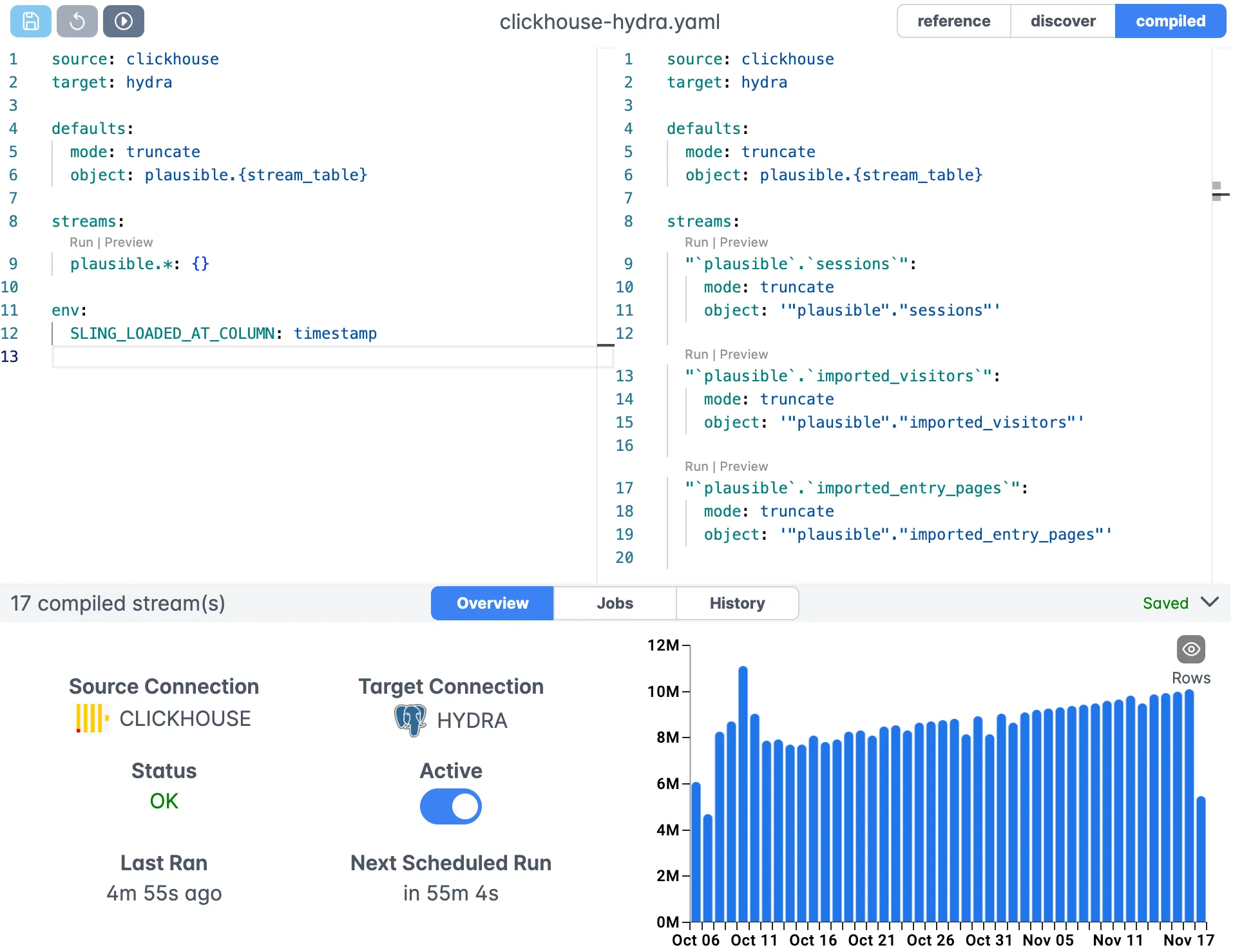
The editor provides:
- Syntax highlighting
- Real-time validation
- Auto-completion
- Version control integration
Connection Management
Manage all your connections in one place with a secure, centralized interface:
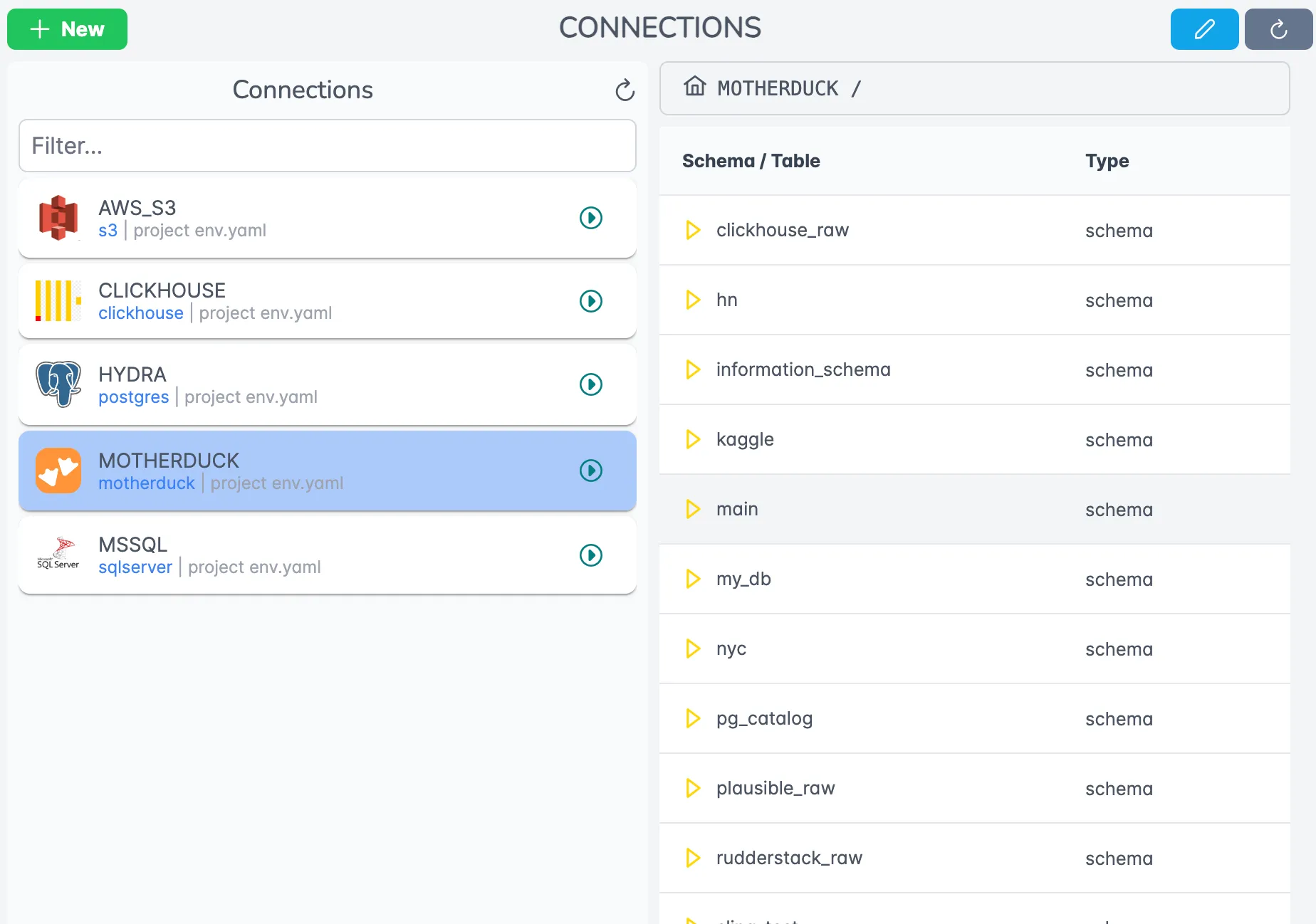
Features include:
- Connection testing
- Credential encryption
- Role-based access control
- Connection sharing within teams
Execution Monitoring
Monitor your data operations in real-time with detailed execution information:
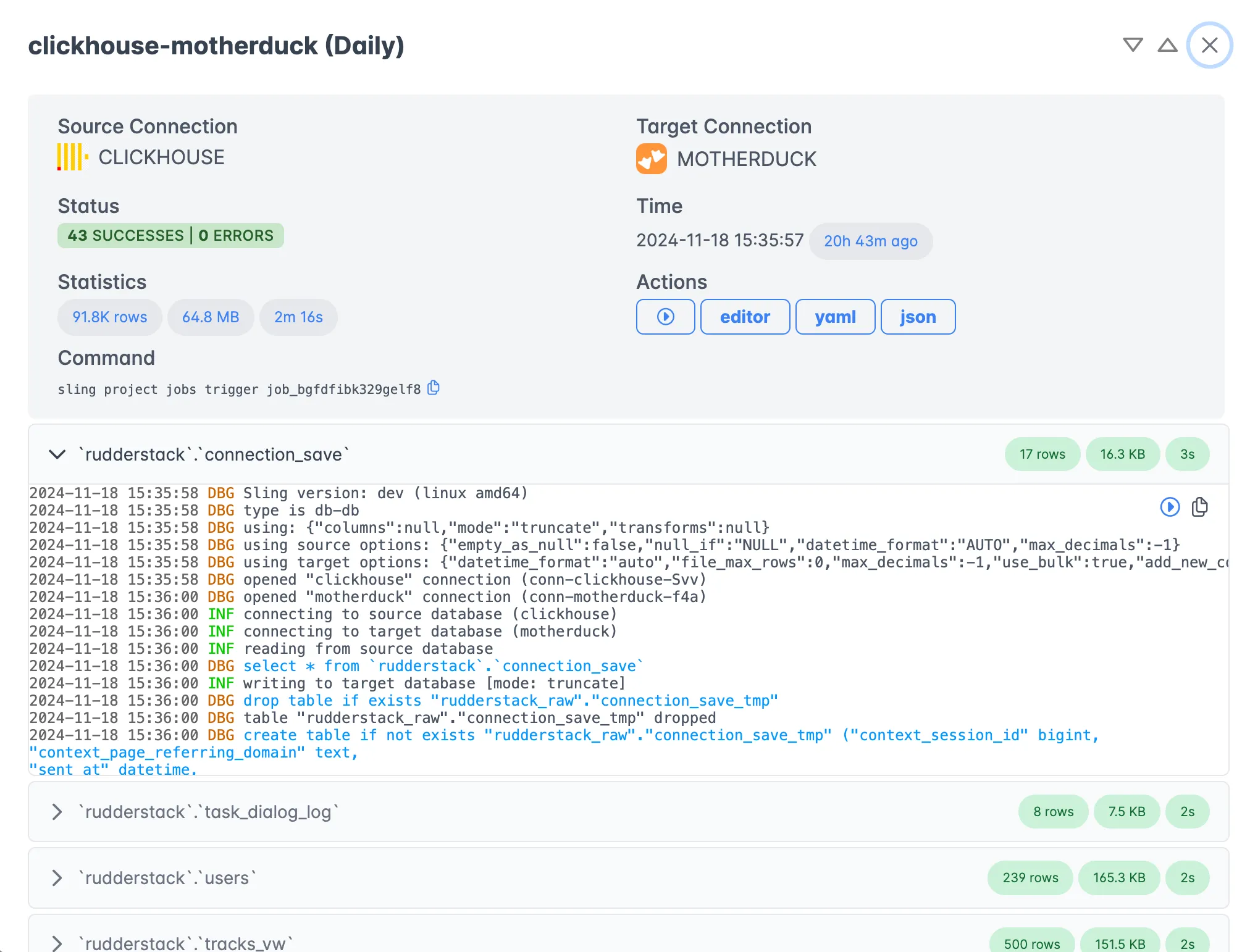
The execution view provides:
- Real-time progress tracking
- Detailed logs and statistics
- Error reporting and diagnostics
- Historical execution data
Next Steps and Resources
To learn more about Sling and its capabilities, check out these resources:
- Sling Documentation
- Replication Concepts
- Source Options
- Target Options
- Runtime Variables
- File to Database Examples
Additional Examples
For more examples and use cases, explore:
With Sling, you can streamline your data operations and focus on deriving value from your data rather than managing complex ETL processes. Whether you choose the CLI for local development or the Platform for enterprise-scale operations, Sling provides the tools you need for efficient data movement and transformation.
Related Guides
If your CSV-to-Snowflake workflow has neighbors, these companion guides cover them:
- Loading local Parquet into Snowflake — Parquet source instead of CSV
- Loading local CSV into Postgres — same CSV source, Postgres target
- Loading local CSV into SQL Server — same CSV source, SQL Server target
- SFTP CSV to Snowflake — CSV from SFTP rather than local disk
- MySQL to Snowflake — when the source is a database instead of a file
FAQ
Do I need to define a connection for local files when loading CSV into Snowflake with Sling?
No. Sling treats the local filesystem as an implicit source. Pass a path like file:///absolute/path/data.csv as the --src-stream value, or use a relative path in a replication YAML under streams.
How does Sling infer column types from a CSV file?
Sling samples the first batch of rows and picks the narrowest type that fits every value: integer, decimal, boolean, timestamp, or string. If a later row breaks the inference, the column widens automatically. For deterministic loads, declare types under the columns key in the replication YAML.
Can Sling read CSV files that use semicolons or pipes instead of commas?
Yes. Set delimiter under source_options to the character you want, for example delimiter: ';'. Sling also auto-detects the delimiter when none is set.
Why are my Snowflake columns named in ALL CAPS after loading from CSV?
Snowflake uppercases unquoted identifiers by default, and Sling preserves the original CSV header case unless you tell it otherwise. Set column_casing: snake under target_options to normalize headers before the load.
How do I load a whole directory of CSV files into one Snowflake table?
Use a wildcard stream pattern such as data/*.csv and point a single object at the table. Sling streams every matched file into the same target table in one run.
Can Sling skip the header row in a CSV file?
Sling reads the header row by default to map columns. If your file has no header, set header: false under source_options and Sling will treat the first row as data and use positional column names (c1, c2, …).
What happens if my local CSV is larger than the available memory on the Sling host?
Sling streams rows in batches rather than loading the whole file into memory, so a 50 GB CSV will load on a 4 GB machine. The bottleneck is typically the Snowflake stage upload rate, not local memory.
How do I run the CSV-to-Snowflake load on a schedule?
The Sling CLI has no built-in scheduler, so wrap the run in cron or a CI job for simple cases. On the Sling Platform you set a schedule on the replication and an agent runs it, with retries and run history handled for you.
Can I load a compressed CSV file into Snowflake without unzipping it first?
Yes. Sling reads gzip files directly, so a path like data/users.csv.gz works as a stream without a separate decompress step. The file is decompressed in the stream, not written to disk.