



The Challenge of Modern Data Pipelines
Last updated: July 2026
Building and maintaining data pipelines can be a complex endeavor. When you need to export data from MySQL to AWS S3 in Parquet format, you typically face several challenges:
- Setting up and maintaining infrastructure
- Writing and testing ETL code
- Managing data formats and schema changes
- Handling incremental updates
- Monitoring and error handling
Sling simplifies this entire process by providing a streamlined solution that handles all these complexities. With just a simple YAML configuration, you can set up a robust data pipeline that exports your MySQL data to S3 in optimized Parquet format.
Getting Started with Sling
To begin using Sling, you’ll need to install the CLI tool. The installation process is straightforward:
# Install Sling CLI on macOS using Homebrew
brew install slingdata-io/sling/sling

# Install on Linux/WSL using curl
curl -L https://github.com/slingdata-io/sling-cli/releases/latest/download/sling-linux-amd64.tar.gz | tar -xz && sudo mv sling /usr/local/bin/

# Verify installation
sling --version
After installation, you’ll need to configure your connections. Sling makes this process simple with the sling conns set command:
# Set up MySQL connection
sling conns set mysql_source url="mysql://user:pass@host:3306/dbname"

# Set up S3 connection
sling conns set s3_target url="s3://access_key:secret_key@bucket_name"
Exporting MySQL to S3 with Sling CLI
The heart of Sling’s functionality lies in its YAML-based replication configuration. Here’s a complete example that exports MySQL data to S3 in Parquet format:
# mysql_to_s3.yaml - Export MySQL tables to S3 as Parquet
source: mysql_source
target: s3_target

streams:
  # Use wildcard to replicate all tables in the schema
  'my_schema.*':
    # Target S3 path using stream_table variable
    object: 'data/{stream_table}'

    # Configure how to handle the replication
    mode: incremental
    primary_key: [id]
    update_key: updated_at

    # Target specific options
    target_options:
      format: parquet
      compression: snappy
      file_max_bytes: 104857600
To run the replication:
# Execute the replication
sling run -r mysql_to_s3.yaml
This configuration will:
- Connect to your MySQL database
- Read data from the
userstable - Convert it to Parquet format with Snappy compression
- Upload it to your S3 bucket under the
data/usersprefix - Track changes using the
updated_atcolumn for incremental updates
Using Sling Platform
While the CLI is powerful for local development and testing, Sling Platform provides a comprehensive web interface for managing your data operations at scale. The platform offers:
- Visual connection management
- YAML configuration editor with syntax highlighting
- Job scheduling and monitoring
- Team collaboration features
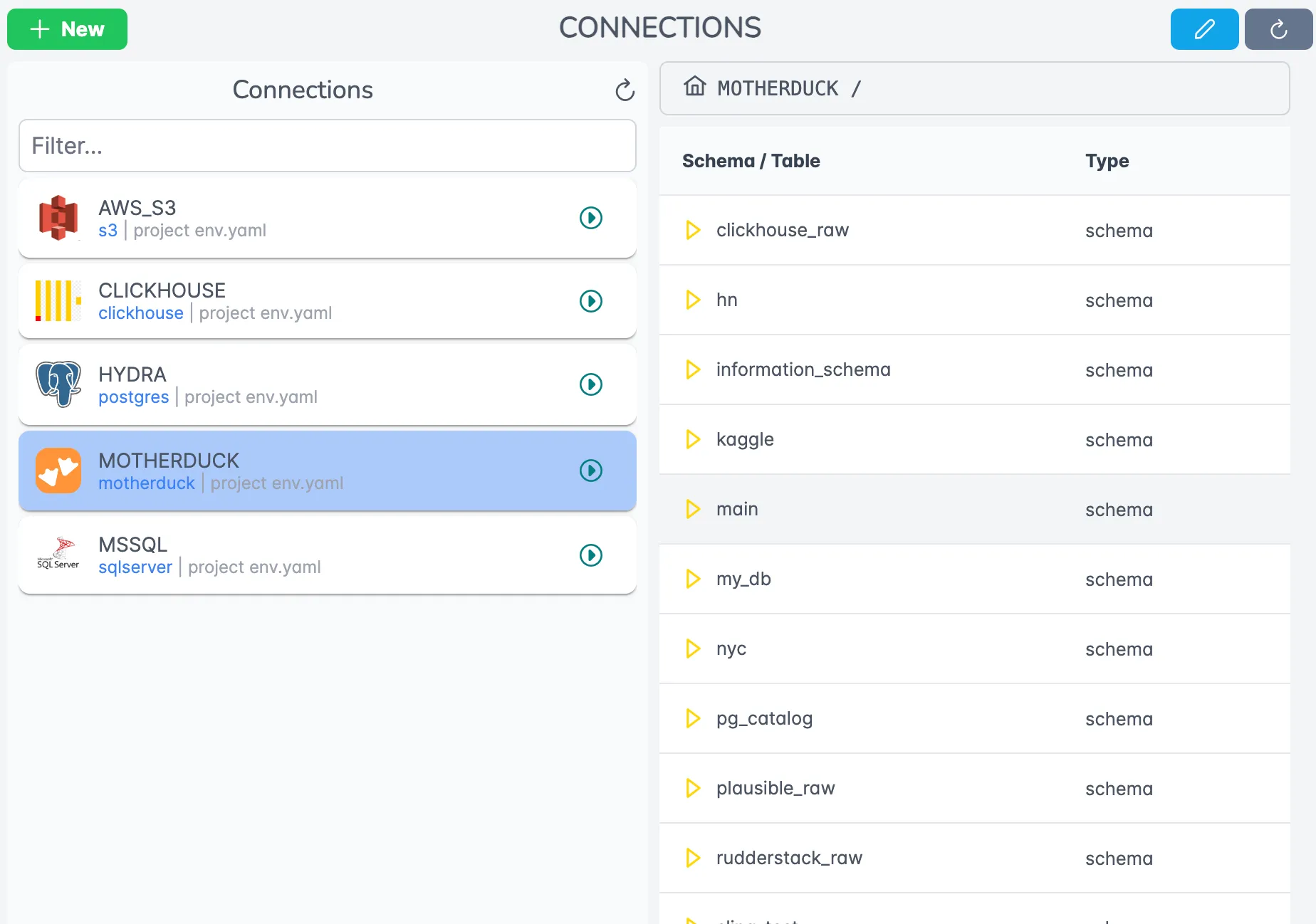
Setting up connections in the platform is straightforward through the visual interface. You can manage both MySQL and S3 connections, along with credentials, in a secure and centralized way.
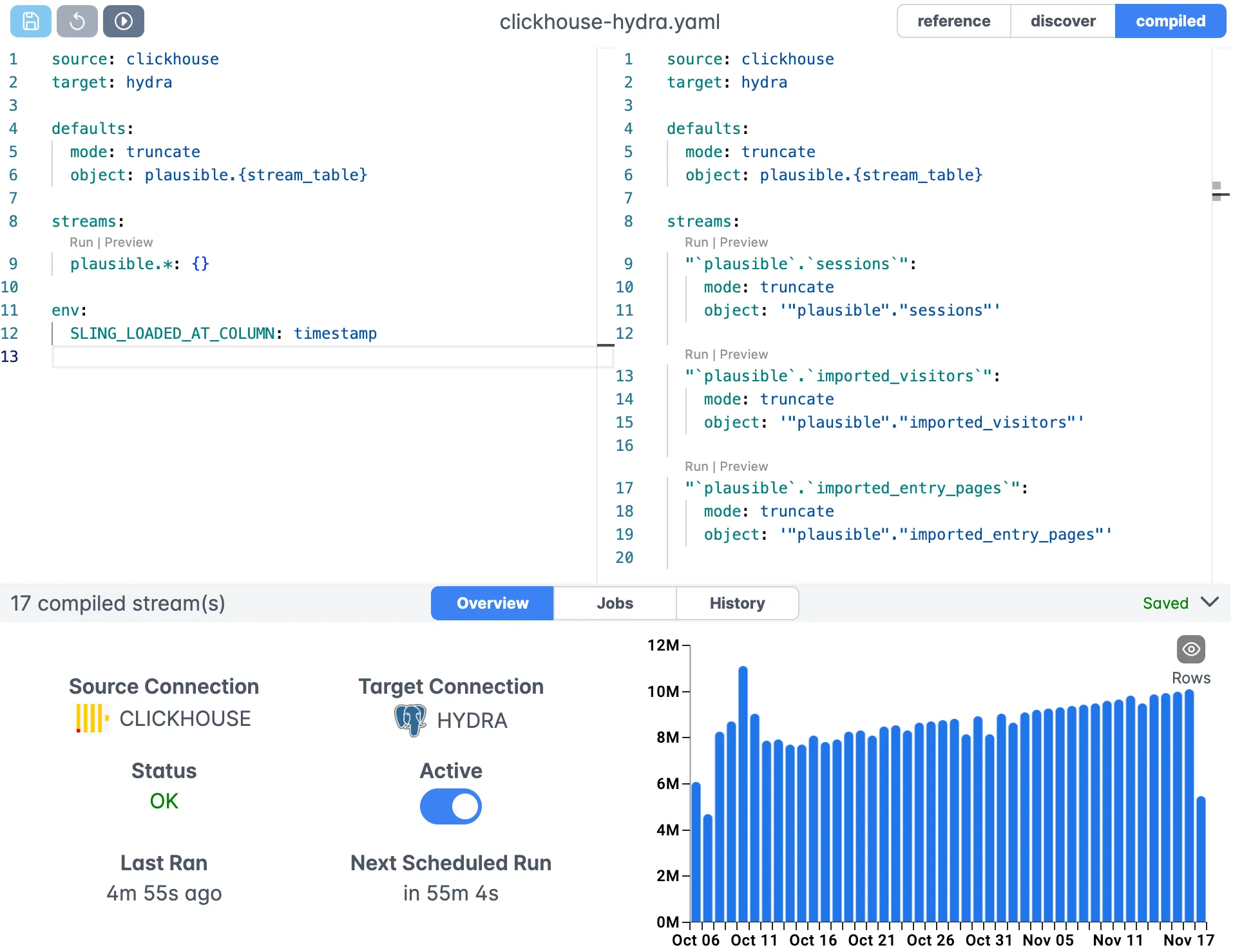
The built-in YAML editor provides syntax highlighting and validation, making it easy to create and modify your replication configurations. You can test your configurations directly in the platform before deploying them to production.
Next Steps
Now that you’ve learned how to export MySQL data to S3 using Sling, here are some resources to help you go further:
- Replication Concepts - Learn more about Sling’s replication capabilities
- Replication Modes - Understand different replication modes
- Source Options - Explore MySQL source configuration options
- Target Options - Learn about S3 and Parquet target options
- Runtime Variables - Use variables in your configurations
- Platform Getting Started - Get started with Sling Platform
- CLI Getting Started - Learn more about the Sling CLI
Whether you’re just getting started with data pipelines or looking to optimize your existing workflows, Sling provides the tools and flexibility you need to succeed. Start with the CLI for local development, then scale up to the platform as your needs grow.
Related Guides
If you’re moving MySQL data around, or working with S3 and Parquet, these companion walkthroughs may help:
- Export MySQL to GCS with Sling
- Export MySQL to S3 as CSV, Parquet, or JSON
- Migrate MySQL to Postgres
- Export Postgres to S3 Parquet
- Load S3 Parquet files into Postgres
FAQ
Why Parquet for S3 instead of CSV or JSON?
Parquet is a columnar format with built-in compression and predicate pushdown, which makes it 5 to 20 times cheaper to scan with Athena, Redshift Spectrum, BigQuery external tables, or DuckDB. CSV is fine for hand-offs to non-technical users, but for a queryable lake Parquet wins on cost and speed.
How do I partition the S3 output by date?
Add date variables to the object: path. For example, data/{stream_table}/dt={YYYY}-{MM}-{DD}/data.parquet writes a new partition per run, which Athena and Glue can pick up automatically once you register the table.
Does incremental mode require an updated_at column on every MySQL table?
It needs an update_key, which is any monotonically increasing column: a timestamp like updated_at, a sequence id, or a version counter. If a table doesn’t have one, fall back to mode: full-refresh or use truncate + reload on a schedule.
What’s the right value for file_max_bytes?
Aim for files between 128MB and 512MB after compression. Smaller files create overhead in S3 and most query engines, larger files hurt parallelism. The 100MB default in this guide is a reasonable starting point for medium tables.
How does Sling handle MySQL types that don’t have a clean Parquet equivalent, like BIT or JSON?
Sling maps BIT(1) to boolean, larger BIT(n) to integer, and JSON to a Parquet string. If you need a richer mapping, use the columns: block to override the inferred type, or use transforms: to reshape the value before write.
Can I split one MySQL table into multiple S3 prefixes by tenant or region?
Yes. Define separate streams that each pull a WHERE slice with a sql: block, then point object: at a different prefix per stream. This is a common pattern for multi-tenant exports where each customer reads only their own folder.
How do I authenticate to S3 if I’m running Sling on EC2 or in EKS?
Skip the access keys in the connection URL and let the AWS SDK pick up the IAM role from the instance profile or the pod’s service account. Sling reads AWS_REGION, AWS_PROFILE, and the standard credential chain just like the AWS CLI.