



Last updated: July 2026
The Data Pipeline Challenge
Moving JSON data into PostgreSQL databases has traditionally been a complex task that requires careful planning and execution. Organizations often struggle with issues like data type mapping, nested JSON structures, and maintaining data consistency during the transfer process. Common approaches involve writing custom scripts, using various ETL tools, or implementing complex data transformation logic - all of which can be time-consuming and error-prone.
How Sling Transforms the Process
Sling revolutionizes this process by providing a streamlined, efficient way to move JSON data into PostgreSQL. With built-in features for handling complex JSON structures, automatic data type mapping, and robust error management, Sling eliminates the need for custom scripts and reduces the time spent on data pipeline development.
Key advantages of using Sling include:
- Automated data type inference and mapping
- Built-in support for nested JSON structures
- Efficient bulk loading capabilities
- Real-time data validation and error handling
- Flexible transformation options during transfer
Let’s explore how to set up and use Sling for your JSON to PostgreSQL data pipeline needs.
Getting Started with Sling
The first step is to install Sling on your system. Sling provides multiple installation options to suit your environment:
# macOS / Linux
curl -fsSL https://slingdata.io/install.sh | bash

# Windows
irm https://slingdata.io/install.ps1 | iex

# Python
pip install sling
After installation, verify that Sling is properly installed by running:
# Check Sling version
sling --version
For more detailed installation instructions, visit the Sling CLI Getting Started Guide.
Setting Up Connections
Before we can start moving data, we need to set up our source (JSON) and target (PostgreSQL) connections. Sling provides multiple ways to manage connections, with a focus on security and ease of use.
Using Environment Variables
The most straightforward way to set up connections is through environment variables. For PostgreSQL, you can use the following format:
# Set up PostgreSQL connection
export PG_TARGET="postgres://user:pass@host:5432/dbname?sslmode=disable"
For more details about environment variables and connection management, visit the Sling Environment Guide.
Using sling conns
Sling provides a convenient command-line interface for managing connections. Here’s how to set up your PostgreSQL connection:
# Set up PostgreSQL connection
sling conns set pg_target type=postgres host=<host> user=<user> database=<database> password=<password> port=<port>
# Test the connection
sling conns test pg_target

# List available connections
sling conns list
For JSON files, you’ll typically use the local file system connection, which is available by default. However, if your JSON files are stored in cloud storage (like S3 or GCS), you’ll need to set up the appropriate connection:
# Set up S3 connection for JSON files
sling conns set s3_source type=s3 bucket=sling-bucket access_key_id=ACCESS_KEY_ID secret_access_key="SECRET_ACCESS_KEY"
Connection Best Practices
When setting up connections, consider these best practices:
- Use environment variables for sensitive credentials
- Store connection strings in a secure location
- Use SSL/TLS for database connections when possible
- Test connections before running replications
- Use descriptive names for your connections
For more information about available connection types and options, visit the Connections Documentation.
CLI-based Data Synchronization
Sling’s CLI provides powerful options for data synchronization through command-line flags. Let’s look at both basic and advanced examples.
Basic Example
Here’s a simple example of loading a JSON file into PostgreSQL:
# Load a local JSON file into PostgreSQL table
sling run \
  --src-stream file://path/to/users.json \
  --tgt-conn pg_target \
  --tgt-object public.users \
  --src-options '{"flatten": true}'
This command:
- Uses a local JSON file as the source
- Targets a PostgreSQL table
- Automatically flattens nested JSON structures
- Infers data types automatically
Advanced Example
For more complex scenarios, you can use additional flags to control the data transfer:
# Load JSON with custom options and transformations
sling run \
  --src-conn s3_source \
  --src-stream "data/users/*.json" \
  --tgt-conn pg_target \
  --tgt-object public.users \
  --src-options '{
    "flatten": true,
    "jmespath": "data.users[*]",
    "datetime_format": "YYYY-MM-DDThh:mmTZD"
  }' \
  --tgt-options '{
    "table_keys": {"index": ["id"]},
    "add_new_columns": true,
    "column_casing": "snake"
  }' \
  --mode incremental \
  --update-key updated_at
This advanced example:
- Reads from multiple JSON files in S3
- Uses JMESPath for JSON traversal
- Handles datetime formatting
- Sets up primary keys
- Enables automatic schema evolution
- Uses incremental loading mode
- Converts column names to snake_case
For a complete overview of available CLI flags, visit the CLI Flags Documentation.
YAML-based Replication
While CLI flags are great for quick operations, YAML-based replication configurations provide a more maintainable and version-controlled approach for complex data pipelines.
Basic Multi-stream Example
Here’s a basic example that loads multiple JSON files into different PostgreSQL tables:
# json_to_postgres.yaml
source: local
target: pg_target

defaults:
  mode: full-refresh
  source_options:
    flatten: true
    empty_as_null: true

streams:
  users.json:
    object: public.users
    source_options:
      jmespath: "users[*]"
    target_options:
      table_keys:
        index: ["id"]

  orders.json:
    object: public.orders
    source_options:
      jmespath: "orders[*]"
    target_options:
      table_keys:
        index: ["order_id"]
Run this configuration using:
# Run the replication configuration
sling run -r json_to_postgres.yaml
Advanced Configuration Example
Here’s a more complex example that demonstrates advanced features:
# complex_json_to_postgres.yaml
source: s3_source
target: pg_target

defaults:
  mode: incremental
  source_options:
    flatten: true
    empty_as_null: true
    datetime_format: "YYYY-MM-DDThh:mmTZD"
  target_options:
    add_new_columns: false
    column_casing: snake

streams:
  "data/users/*.json":
    object: public.users
    update_key: updated_at

    source_options:
      jmespath: "data.users[*]"

    target_options:
      table_keys:
        primary: ["id"]
      pre_sql: "vacuum analyze {table}"

    transforms:
      email: [trim_space]

  "data/orders/*.json":
    object: public.orders
    update_key: order_date
    source_options:
      jmespath: "data.orders[*]"
    target_options:
      table_keys:
        primary: ["order_id"]
This advanced configuration:
- Uses wildcards to process multiple files
- Implements incremental loading with update keys
- Applies column transformations
- Sets up primary and foreign keys
- Includes pre-SQL operations
- Handles data type conversions
For more details about replication configuration options, visit:
The Sling Platform
While the CLI is powerful for local development and automation, the Sling Platform provides a comprehensive web-based interface for managing your data pipelines at scale.
Platform Components
The Sling Platform consists of several key components:
- Web Interface: A modern, intuitive interface for managing all aspects of your data operations
- Agents: Distributed workers that execute data operations in your infrastructure
- Connection Manager: Centralized management of all your data connections
- Job Scheduler: Automated scheduling and orchestration of data pipelines
- Monitoring System: Real-time monitoring and alerting for your data operations
Visual Workflow
The platform provides a visual interface for managing your data pipelines:
Connection Management
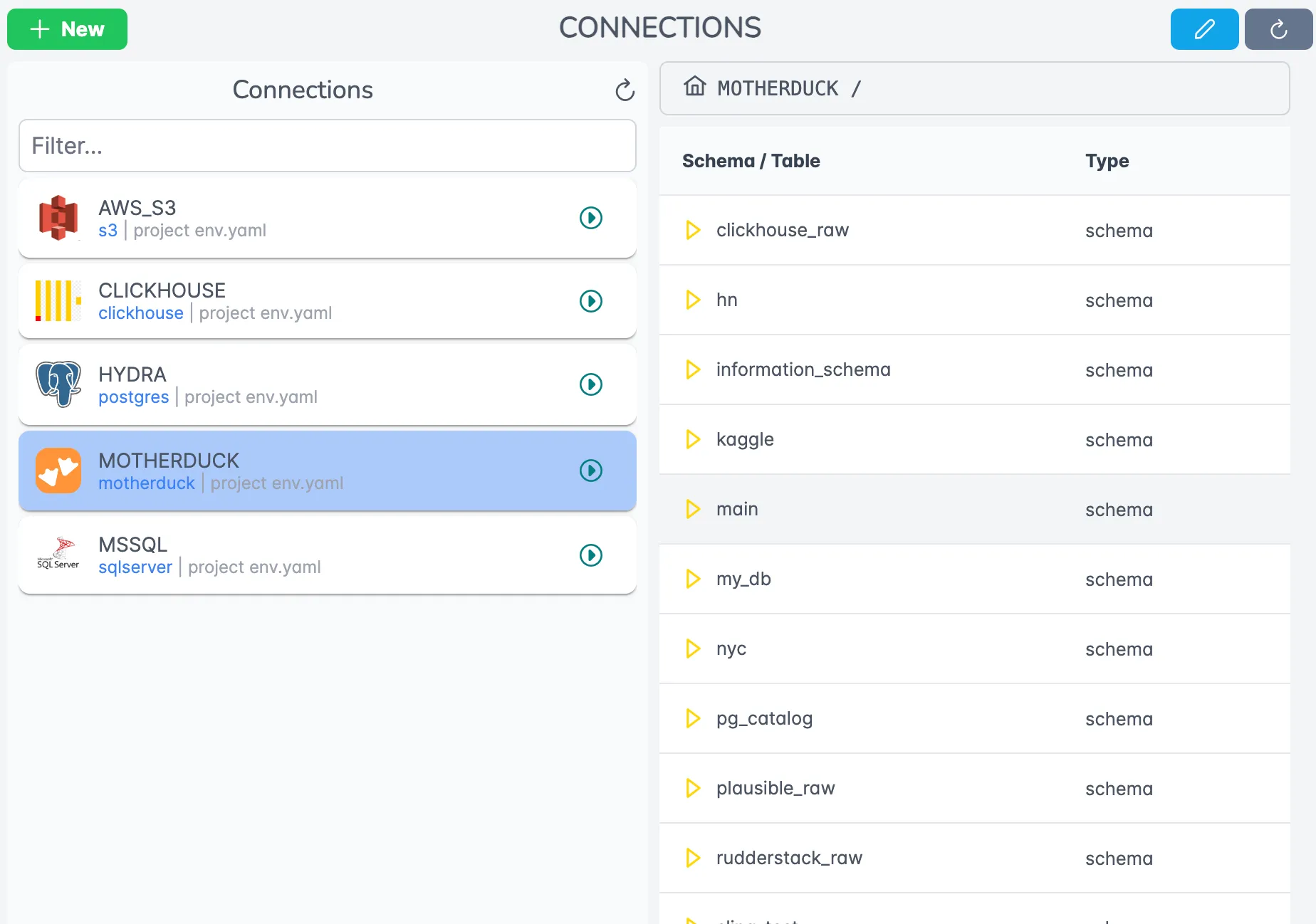
The Connections page provides a centralized view of all your data sources and targets. You can:
- Add and configure new connections
- Test connection health
- Manage connection permissions
- View connection usage statistics
Replication Editor
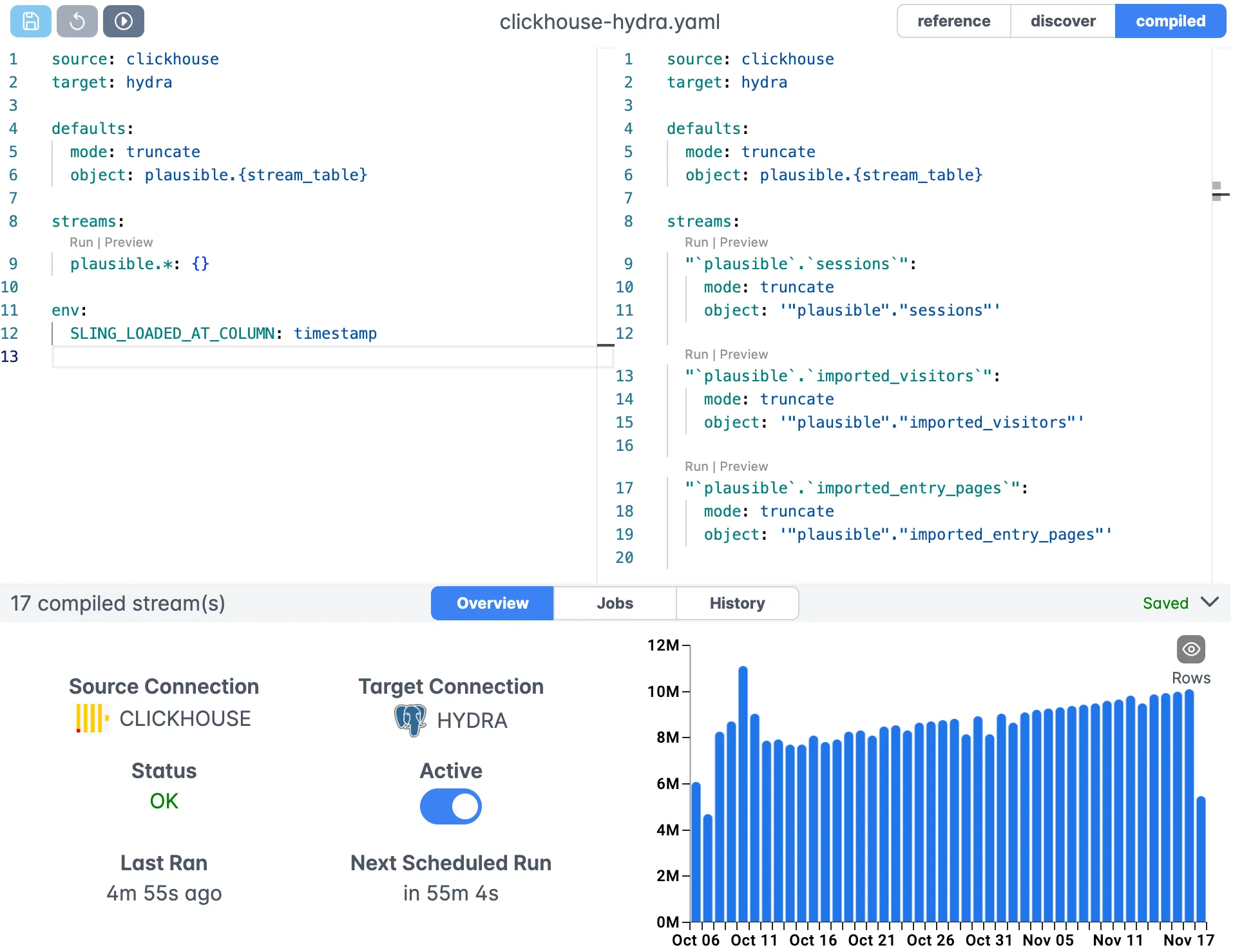
The visual editor allows you to:
- Create and edit replication configurations
- Test configurations in real-time
- View data previews
- Manage version control
- Deploy configurations to production
Platform Features
The Sling Platform offers additional features for enterprise data operations:
Team Collaboration
- Role-based access control
- Configuration sharing
- Change tracking
Monitoring and Alerting
- Real-time job status
- Error notifications
- Performance metrics
- Custom alerts
Version Control
- Configuration history
- Rollback capabilities
- Deployment tracking
Security
- Encrypted credentials
- Audit logging
- Agent authentication
For more information about the Sling Platform, visit the Platform Documentation.
Next Steps
Now that you understand how to use Sling for JSON to PostgreSQL data pipelines, here are some resources to help you go further:
Additional Resources
Documentation
Examples
Connection Types
Getting Help
If you need assistance or want to engage with the Sling community:
- Visit the Sling Documentation for comprehensive guides
- Join the community forums for discussions and support
- Contact the Sling team for enterprise support options
- Follow Sling on social media for updates and tips
Start small with simple replications and gradually explore more advanced features as you become comfortable with the platform. Remember to always test your configurations in a development environment before deploying to production.
Related Guides
If you’re working with JSON sources and Postgres targets, these articles cover adjacent patterns:
- Postgres to Local JSON with Sling
- Postgres to S3 JSON with Sling
- Load Local CSV into Postgres
- Loading Local Parquet to Postgres
- SFTP JSON to Snowflake with Sling
Frequently Asked Questions
Does Sling flatten nested JSON automatically, or do I need to configure it?
Sling does not flatten by default. Set flatten: true under source_options (or pass --src-options '{"flatten": true}' on the CLI) to expand nested objects into top-level columns. Arrays are not flattened into rows. Use jmespath: to project the array you want before extraction.
Can Sling load a JSON file that contains a single object at the root rather than an array of records?
Yes, but you usually want to use jmespath: to point Sling at the array you actually want to ingest. If the file is a single object you want stored as one row, set flatten: true and Sling will produce a one-row table with each key as a column.
How do I handle JSONL (newline-delimited JSON) files with Sling?
Sling auto-detects JSONL by extension and content. If your files use a non-standard extension, set format: jsonlines under source_options to force the format. No jmespath: is needed for JSONL since each line is already a record.
What happens if my JSON files have inconsistent schemas across records?
Sling builds the schema from the union of all observed fields in the batch. Missing fields land as NULL on the Postgres side, and new fields trigger an ALTER TABLE if target_options.add_new_columns: true is set. For wildly inconsistent JSON, consider loading the raw payload as a single JSONB column.
Can Sling write to a JSONB column instead of expanding the JSON into separate columns?
Yes. Skip flatten: true and define the target column as JSONB beforehand, or let Sling create the table fresh and post-cast a payload column. You can also use a transforms: block to serialize specific nested fields back into JSON strings before insert.
How does incremental loading work when the source is a directory of JSON files in S3?
Sling tracks the update_key: value (typically a timestamp inside the records) across runs, the same way it does for databases. The file path itself can also act as the incremental boundary if you partition your S3 prefix by date and point each run at the new prefix.
Why are some of my JSON timestamps loading as strings instead of timestamps in Postgres?
Sling matches timestamps against a set of common formats. If your JSON uses an unusual layout, set source_options.datetime_format to an explicit pattern like YYYY-MM-DDThh:mm:ssTZD. Without a match, the column falls back to text so the data isn’t lost.