



Last updated: June 2026
Introduction
Setting up a data pipeline from SQL Server to BigQuery traditionally involves numerous complex steps and considerations. Organizations often struggle with infrastructure setup, authentication management, schema compatibility, and maintaining optimal performance. This complexity can lead to increased development time, higher costs, and potential reliability issues.
Sling simplifies this entire process by providing a streamlined, zero-infrastructure approach to data replication. With Sling, you can:
- Configure connections with simple environment variables or CLI commands
- Automatically handle schema mapping and data type conversions
- Optimize performance with built-in batch processing and parallel execution
- Monitor and manage replications through both CLI and web interface
In this guide, we’ll walk through the process of setting up a SQL Server to BigQuery replication using Sling, demonstrating how to overcome common challenges and implement an efficient data pipeline in minutes rather than days or weeks.
Installation
Getting started with Sling is straightforward. You can install it using various package managers depending on your operating system:
# macOS / Linux
curl -fsSL https://slingdata.io/install.sh | bash

# Windows
irm https://slingdata.io/install.ps1 | iex

# Python
pip install sling
After installation, verify that Sling is properly installed by running:
# Check sling version
sling --version
For more detailed installation instructions and options, visit the installation guide.
Setting Up Connections
Before we can start replicating data, we need to set up our source SQL Server and target BigQuery connections. Sling provides multiple ways to manage connections, including environment variables and the sling conns command.
SQL Server Connection
For SQL Server, you’ll need the following information:
- Server host and port
- Database name
- Username and password
- Additional connection parameters (if needed)
You can set up the SQL Server connection using environment variables:
# Set SQL Server connection using environment variables
export SQLSERVER="sqlserver://username:password@host:port/database?options"
Alternatively, use the sling conns set command:
# Set SQL Server connection using CLI
sling conns set sqlserver url="sqlserver://username:password@host:port/database?options"
BigQuery Connection
For BigQuery, you’ll need:
- Google Cloud project ID
- Service account credentials
- Dataset information
Set up the BigQuery connection:
# Set BigQuery connection using CLI
sling conns set BIGQUERY type=bigquery project=<project> dataset=<dataset> gc_bucket=<gc_bucket> key_file=/path/to/service.account.json location=<location>
Testing Connections
After setting up your connections, it’s important to verify they work correctly:
# Test SQL Server connection
sling conns test sqlserver

# Test BigQuery connection
sling conns test bigquery
You can also list available streams (tables) in your SQL Server database:
# List available tables in SQL Server
sling conns discover sqlserver
For more details about connection configuration, visit the environment documentation.
Creating the Replication Configuration
Sling uses YAML files to define replication configurations. Let’s create a configuration file called sqlserver_to_bigquery.yaml that will handle our data replication:
# Define source and target connections
source: sqlserver
target: bigquery

# Default settings for all streams
defaults:
  target_options:
    # Automatically add new columns if they appear in source
    add_new_columns: true
    # Automatically convert casing to snake
    column_casing: snake
  mode: full-refresh

# Define the streams to replicate
streams:
  # Use wildcard to replicate all tables in the 'sales' schema
  'sales.*':
    object: 'mydataset.{stream_table}'

  # Incremental replication with primary key
  "sales.orders":
    object: "mydataset.orders"
    mode: incremental
    primary_key: ["order_id"]
    update_key: "last_modified_date"

  # Replication with custom SQL query
  "custom_orders":
    object: "mydataset.filtered_orders"
    mode: full-refresh
    sql: |
      SELECT
        o.order_id,
        o.order_date,
        c.customer_name,
        p.product_name,
        o.quantity,
        o.total_amount
      FROM sales.orders o
      JOIN sales.customers c ON o.customer_id = c.customer_id
      JOIN sales.products p ON o.product_id = p.product_id
      WHERE o.order_date >= '2023-01-01'
Running the Replication
Once you have your configuration file ready, you can start the replication using the Sling CLI:
# Run the replication
sling run -r sqlserver_to_bigquery.yaml
You can also run specific streams:
# Run only the customers table replication
sling run -r sqlserver_to_bigquery.yaml --stream sales.customers
Advanced Configuration Options
Sling provides various options to customize your replication process. Here are some common configurations:
streams:
  "sales.transactions":
    object: "mydataset.transactions"
    mode: incremental
    primary_key: ["transaction_id"]
    update_key: "transaction_date"

    # Target-specific options
    target_options:
      # Limit the number of rows per batch
      batch_limit: 10000
      # Execute SQL before replication starts
      pre_sql: "TRUNCATE TABLE mydataset.transactions_staging"
      # Execute SQL after replication completes
      post_sql: |
        MERGE mydataset.transactions_main t
        USING mydataset.transactions s
        ON t.transaction_id = s.transaction_id
        WHEN MATCHED THEN UPDATE SET ...
        WHEN NOT MATCHED THEN INSERT ...
For more detailed information about replication configuration options, visit:
Sling vs Dataflow and Cloud Data Fusion
If you’ve looked into moving SQL Server to BigQuery, you’ve likely seen Google’s own paths: the Dataflow SQL Server to BigQuery template and the Cloud Data Fusion replication tutorial. They’re capable, but both carry real setup overhead. Data Fusion asks you to spin up an instance, enable the replication accelerator, download and upload a SQL Server JDBC driver with a specific filename, and turn on CDC at the database level before you can deploy a job. Dataflow templates need you to manage workers, networking, and a staging bucket.
Here’s how the approaches line up for a typical batch or incremental pipeline:
| Concern | Dataflow / Data Fusion | Sling |
|---|---|---|
| Infrastructure to provision | Instances, workers, staging buckets | None — a single CLI |
| JDBC driver setup | Download and upload manually | Not required |
| Time to first load | Hours of configuration | Minutes |
| Incremental loads | CDC must be enabled on the server | Watermark-based, no server changes |
| Best fit | Continuous streaming at scale | Scheduled batch and incremental ELT |
If your requirement is genuine sub-second streaming replication, a CDC engine is the right tool. For the more common case of a scheduled load that runs every few minutes to a few hours, Sling skips the infrastructure and you can have a working pipeline the same day.
SQL Server to BigQuery Data Type Mapping
One of the steps that makes hand-built SQL Server to BigQuery pipelines brittle is reconciling the two type systems. BigQuery has a smaller, more opinionated set of types than SQL Server, so several source types collapse into one target type. Sling handles this mapping automatically on the first load. The common conversions:
| SQL Server type | BigQuery type | Notes |
|---|---|---|
INT, SMALLINT, BIGINT | INT64 | All integer widths map to a single 64-bit integer |
DECIMAL, NUMERIC, MONEY | NUMERIC / BIGNUMERIC | High-precision decimals promote to BIGNUMERIC |
FLOAT, REAL | FLOAT64 | |
BIT | BOOL | |
VARCHAR, NVARCHAR, TEXT | STRING | Length limits are dropped; BigQuery STRING is variable-length |
DATETIME, DATETIME2 | DATETIME | |
DATETIMEOFFSET | TIMESTAMP | Stored as UTC with the offset applied |
UNIQUEIDENTIFIER | STRING | GUIDs are written as text |
VARBINARY, IMAGE | BYTES |
If you need to override the inferred mapping for a specific column, declare it with a columns block on the stream:
streams:
  "sales.orders":
    object: "mydataset.orders"
    columns:
      order_total: "bignumeric"   # force high precision
      external_id: "string"
This is also where you’d pin a column that should stay text even though it looks numeric, such as a zero-padded account number.
Incremental and CDC-Style Loads
For tables that change continuously, reloading the whole thing on every run wastes time and BigQuery bytes. Sling’s incremental mode pulls only the rows that changed since the last run, which is the practical equivalent of CDC for most batch pipelines, without needing to enable change tracking on the SQL Server side:
source: sqlserver
target: bigquery

defaults:
  mode: incremental
  target_options:
    add_new_columns: true

streams:
  "sales.orders":
    object: "mydataset.orders"
    primary_key: ["order_id"]
    update_key: "last_modified_date"
On each run Sling tracks the maximum last_modified_date it has seen and only requests newer rows, then merges them into BigQuery on the order_id key so updates land in place rather than duplicating. Because the load goes through BigQuery’s bulk path rather than streaming inserts, you avoid the per-row streaming charge, and moving fewer rows keeps the bytes-processed cost down. For the full set of modes, see the replication modes documentation. If your source is Snowflake instead of SQL Server, the same pattern covers Snowflake to BigQuery replication.
Understanding Sling Platform Components
While the CLI provides powerful command-line capabilities, Sling also offers a comprehensive web-based platform that simplifies data replication management through a visual interface.
Visual Configuration Editor
The Sling Platform includes a sophisticated configuration editor that makes it easy to create and modify replication configurations through a user-friendly interface.
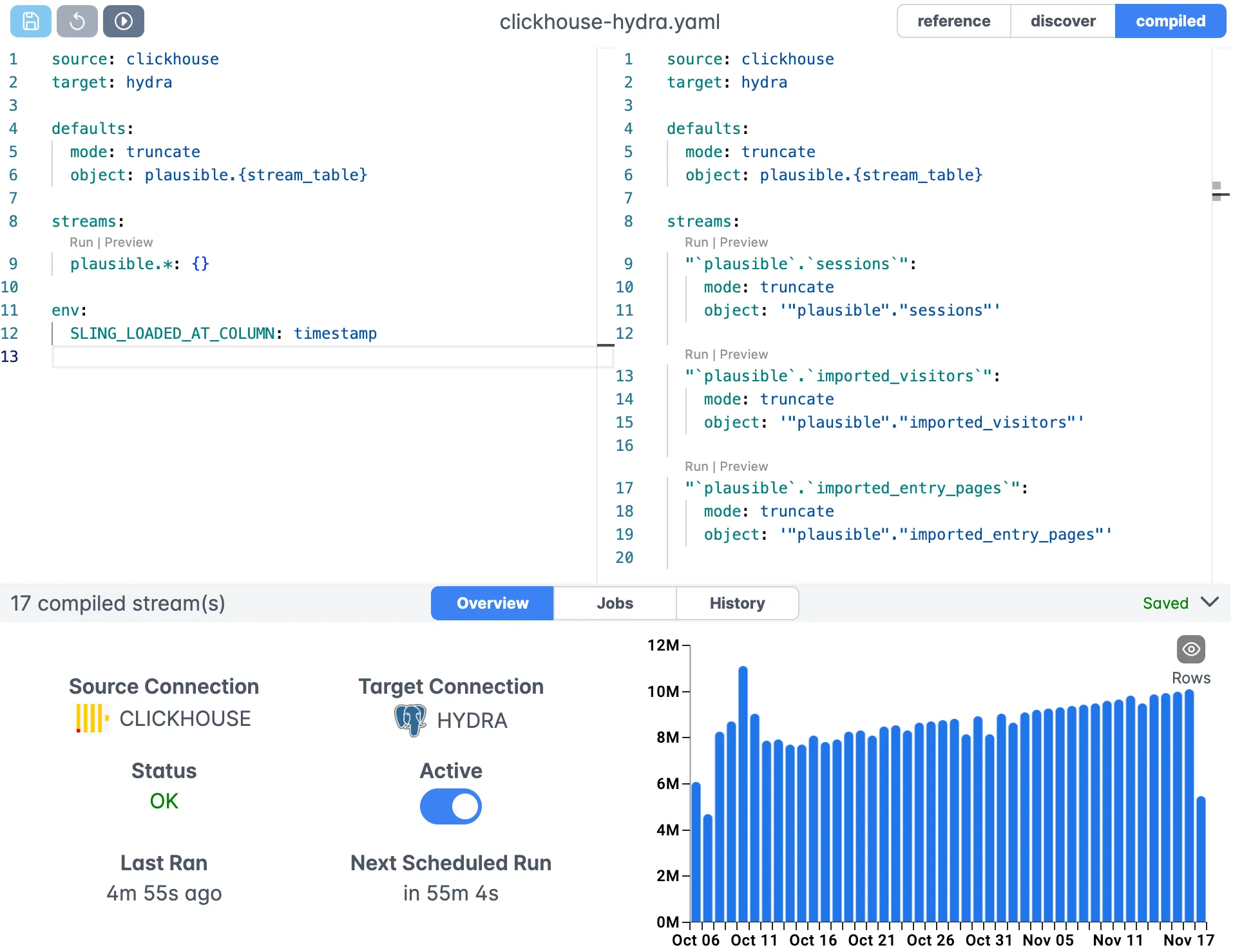
The editor provides:
- Syntax highlighting for YAML configurations
- Auto-completion for connection names and options
- Real-time validation of your configuration
- Easy access to documentation and examples
Connection Management
The platform provides a centralized interface for managing all your connections, making it easy to organize and maintain your data sources and destinations.
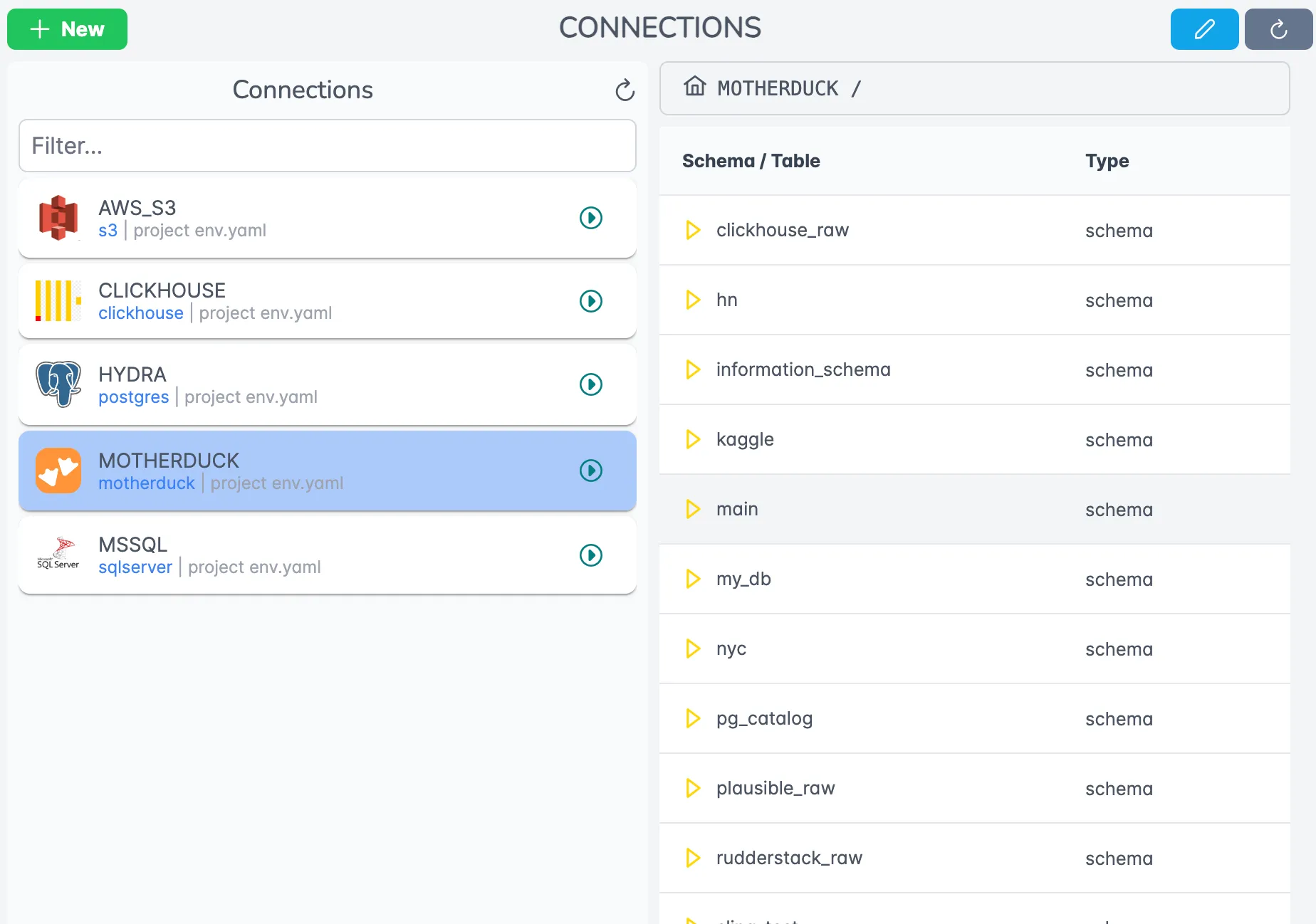
Key features include:
- Secure credential management
- Connection testing and validation
- Stream discovery and exploration
- Role-based access control
Execution Monitoring
Monitor your replications in real-time with detailed execution statistics and logs.
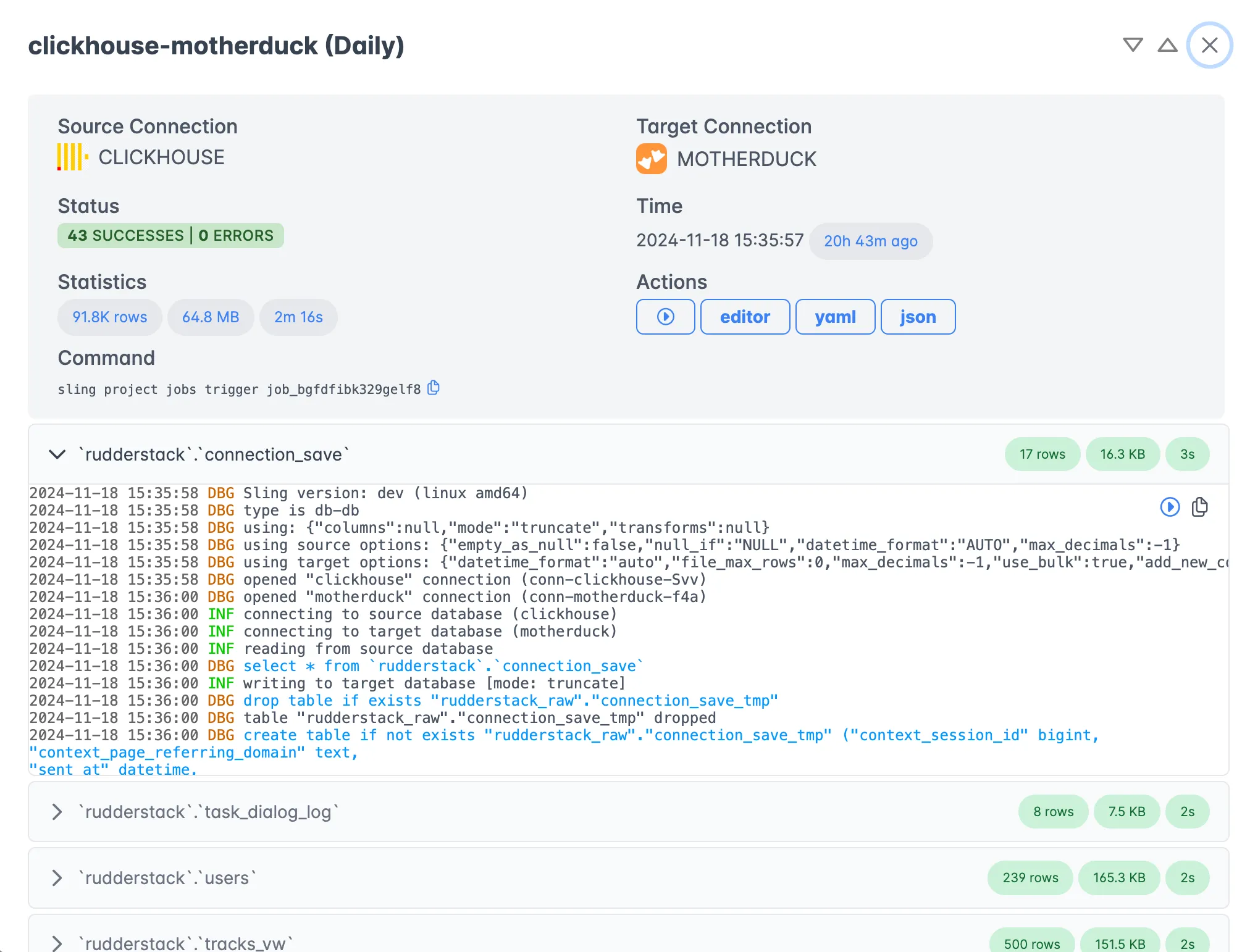
The monitoring interface provides:
- Real-time progress tracking
- Detailed performance metrics
- Error logging and troubleshooting
- Historical execution records
Platform Benefits
The Sling Platform offers several advantages over CLI-only usage:
- Team collaboration and sharing
- Centralized configuration management
- Scheduled executions
- Monitoring and alerting
- Audit logging
For more information about the Sling Platform, visit the platform documentation.
Next Steps and Resources
Now that you have a solid understanding of how to use Sling for SQL Server to BigQuery replication, here are some additional resources to help you get the most out of the platform:
Additional Examples
Database Connection Guides
Advanced Topics
Sling supports many other databases and storage systems. Check out our complete list of supported connections to explore more possibilities for your data movement needs.
Related Guides
If you’re moving data between SQL Server, BigQuery, and other warehouses, these walkthroughs cover adjacent paths:
- Postgres to BigQuery with Sling
- Snowflake to BigQuery with Sling
- MySQL to BigQuery with Sling
- SQL Server to Snowflake with Sling
- SQL Server to Postgres with Sling
Frequently Asked Questions
Does Sling support replicating SQL Server tables that contain schema-qualified names with mixed casing?
Yes. Sling preserves the source schema and table names by default, and you can override the target object using the object: key in each stream. If you need consistent casing on the BigQuery side, set target_options.column_casing: snake in your defaults so column identifiers normalize during load.
How does Sling handle the BigQuery staging area when loading from SQL Server?
Sling uploads the extracted batches to your configured GCS bucket (gc_bucket on the BigQuery connection) and then issues a BigQuery load job from those staging files. The staging objects are cleaned up automatically once the load completes, so you don’t end up with leftover files in the bucket between runs.
Can I replicate SQL Server tables with computed columns or columns of type sql_variant?
Computed columns are read as their evaluated value, which is what BigQuery expects. The sql_variant type does not have a direct equivalent in BigQuery, so Sling serializes those values as strings. If you need to keep the original semantics, write a custom sql: stream that casts the column explicitly before extraction.
What is the easiest way to add a WHERE clause when extracting from SQL Server?
Use the where: key under the stream definition for simple filters, or use a sql: stream when the predicate involves joins or expressions. For incremental loads, set update_key: to a monotonic column and Sling will manage the WHERE clause automatically across runs.
Does incremental mode work for SQL Server tables that don’t have a single primary key?
Yes, as long as you can supply a unique identifier. You can pass primary_key: as an array of multiple columns to support composite keys. If no usable primary key exists, switch to backfill mode and define a deterministic update_key.
How do I keep BigQuery schema in sync when SQL Server columns are added or dropped?
Set target_options.add_new_columns: true to have Sling automatically add new columns the first time it sees them. Column drops are not propagated by default — they would be a destructive change against historical data. You can run a manual ALTER TABLE on BigQuery if you want to remove unused columns.
Can I run the same replication file on both my laptop and the Sling Platform?
Yes. The YAML format is identical across CLI and Platform. The Platform reads the same file and just adds scheduling, agents, and monitoring on top, so you can author locally and promote to the Platform without rewrites.