



Introduction
Last updated: September 2026
PostgreSQL and DuckDB serve complementary roles in modern data architectures - PostgreSQL as a robust operational database and DuckDB as a powerful analytical engine. Moving data between these systems efficiently is crucial for analytics and reporting workflows. Sling simplifies this process by providing a seamless, efficient way to replicate data from PostgreSQL to DuckDB.
As an open-source data movement tool, Sling offers:
- Simple installation and configuration
- Multiple replication modes
- Efficient handling of large datasets
- Built-in data type mapping
- Automated schema management
- Real-time monitoring
Understanding Traditional Data Pipeline Challenges
Building a data pipeline between PostgreSQL and DuckDB traditionally requires significant effort and resources:
Development Complexity
- Custom scripts for data extraction and loading
- Manual data type conversion handling
- Complex error handling and retry logic
- Scheduling and orchestration setup
Resource Overhead
- Development and maintenance time
- Infrastructure for data processing
- Ongoing monitoring and troubleshooting
These challenges often make a seemingly simple data movement task into a complex engineering project. Sling addresses these pain points with its modern, streamlined approach.
Getting Started with Sling
Before we dive into replicating data from PostgreSQL to DuckDB, let’s set up Sling on your system. Sling offers multiple installation methods to suit different operating systems and preferences.
Installation
Choose the installation method that matches your operating system:
# macOS / Linux
curl -fsSL https://slingdata.io/install.sh | bash

# Windows
irm https://slingdata.io/install.ps1 | iex

# Python
pip install sling
After installation, verify that Sling is properly installed by checking its version:
# Check Sling version
sling --version
Initial Setup
Sling uses a configuration directory to store connection details and other settings. The configuration directory is typically located at:
- Linux/macOS:
~/.sling/ - Windows:
C:\Users\<username>\.sling\
The first time you run Sling, it will automatically create this directory and a default configuration file. You can also specify a custom location using the SLING_HOME_DIR environment variable.
For more detailed installation instructions and configuration options, visit the Sling CLI Getting Started Guide.
Setting Up Database Connections
Before we can replicate data, we need to configure our source (PostgreSQL) and target (DuckDB) connections. Sling provides multiple ways to set up and manage connections securely.
PostgreSQL Connection Setup
You can set up a PostgreSQL connection using any of these methods:
Using Environment Variables
The simplest way is to use environment variables:
# Set PostgreSQL connection using environment variable
export POSTGRES_DB='postgresql://myuser:[email protected]:5432/mydatabase?sslmode=require'
Using the Sling CLI
Alternatively, use the sling conns set command:
# Set up PostgreSQL connection with individual parameters
sling conns set POSTGRES_DB type=postgres host=host.ip user=myuser database=mydatabase password=mypass port=5432

# Or use a connection URL
sling conns set POSTGRES_DB url="postgresql://myuser:[email protected]:5432/mydatabase?sslmode=require"
Using the Sling Environment File
You can also add the connection details to your ~/.sling/env.yaml file:
connections:
  POSTGRES_DB:
    type: postgres
    host: host.ip
    user: myuser
    password: mypass
    port: 5432
    database: mydatabase
    sslmode: require
    schema: public
DuckDB Connection Setup
DuckDB connections in Sling are straightforward as they primarily involve specifying a file path. Here’s how to set up a DuckDB connection:
Using the Sling CLI
# Set up DuckDB connection
sling conns set DUCKDB type=duckdb instance=/path/to/database.duckdb
Using Environment Variables
# Set DuckDB connection using environment variable
export DUCKDB='duckdb:///path/to/database.duckdb'
Using the Sling Environment File
Add to your ~/.sling/env.yaml:
connections:
  DUCKDB:
    type: duckdb
    instance: /path/to/database.duckdb
Testing Connections
After setting up your connections, verify them using the sling conns commands:
# List all configured connections
sling conns list

# Test PostgreSQL connection
sling conns test POSTGRES_DB

# Test DuckDB connection
sling conns test DUCKDB

# Discover available tables in PostgreSQL
sling conns discover POSTGRES_DB
For more details about connection configuration and options, refer to:
Basic Data Replication with CLI Flags
Once you have your connections set up, you can start replicating data from PostgreSQL to DuckDB using Sling’s CLI flags. Let’s look at some common usage patterns.
Simple Table Replication
The most basic way to replicate data is using the sling run command with source and target specifications:
# Replicate a single table from PostgreSQL to DuckDB
sling run \
  --src-conn POSTGRES_DB \
  --src-stream "public.users" \
  --tgt-conn DUCKDB \
  --tgt-object "users"
Using Custom SQL Queries
You can use custom SQL queries to transform or filter data during replication:
# Replicate with a custom SQL query
sling run \
  --src-conn POSTGRES_DB \
  --src-stream "SELECT id, name, email, created_at FROM users WHERE created_at > '2024-01-01'" \
  --tgt-conn DUCKDB \
  --tgt-object "main.recent_users"
Advanced CLI Options
For more complex scenarios, you can use additional flags to customize the replication:
# Replicate with specific columns and options
sling run \
  --src-conn POSTGRES_DB \
  --src-stream "public.orders" \
  --tgt-conn DUCKDB \
  --tgt-object "main.orders" \
  --select "id,customer_id,total_amount,status" \
  --mode incremental \
  --update-key "updated_at" \
  --tgt-options '{ "add_new_columns": true, "table_keys": { "primary": ["id"] } }'
Monitoring Progress
Sling provides real-time progress information during replication:
# Enable detailed logging
sling run \
  --src-conn POSTGRES_DB \
  --src-stream "public.large_table" \
  --tgt-conn DUCKDB \
  --tgt-object "main.large_table" \
  --debug
For a complete list of available CLI flags and options, refer to the Sling CLI Flags documentation.
Advanced Replication with YAML Configuration
While CLI flags are great for simple replications, YAML configuration files provide more flexibility and reusability for complex scenarios. Let’s explore how to use YAML configurations with Sling.
Basic Multi-Stream Example
Create a file named postgres_to_duckdb.yaml with the following content:
# Basic configuration for replicating multiple tables
source: POSTGRES_DB
target: DUCKDB

defaults:
  mode: full-refresh
  target_options:
    add_new_columns: true

streams:
  public.users:
    object: main.users
    select: [id, username, email, created_at]
    primary_key: [id]

  public.orders:
    object: main.orders
    select: [order_id, user_id, total_amount, status, order_date]
    primary_key: [order_id]
Run the replication using:
# Execute the replication configuration
sling run -r postgres_to_duckdb.yaml
Complex Configuration Example
Here’s a more advanced configuration that demonstrates various Sling features:
source: POSTGRES_DB
target: DUCKDB

defaults:
  mode: incremental
  target_options:
    add_new_columns: true
    column_casing: snake
    table_keys:
      primary: [id]

streams:
  # Use runtime variables for dynamic table names
  'public.{table_name}':
    object: 'main.{stream_table}'
    update_key: updated_at
    source_options:
      datetime_format: YYYY-MM-DD HH:mm:ss
    target_options:
      pre_sql: |
        CREATE TABLE IF NOT EXISTS {stream_table} (
          id INTEGER PRIMARY KEY,
          data JSON
        )

  # Custom SQL query with transforms
  custom_query:
    object: main.analytics_summary
    sql: |
      SELECT
        date_trunc('day', created_at) as date,
        count(*) as total_orders,
        sum(amount) as total_amount
      FROM public.orders
      GROUP BY 1
Using Runtime Variables
Sling supports runtime variables that can be used in your YAML configurations:
source: POSTGRES_DB
target: DUCKDB

env:
  SCHEMA: public
  TABLE_PREFIX: analytics_

streams:
  '{SCHEMA}.users':
    object: 'main.{TABLE_PREFIX}{stream_table}'
    mode: incremental
    update_key: updated_at
For more information about YAML configurations, refer to:
Sling Platform Overview
While the CLI is powerful for local development and simple workflows, the Sling Platform provides a comprehensive web-based interface for managing your data operations at scale. Let’s explore the key components and features of the platform.
Web Interface
The Sling Platform offers an intuitive web interface for managing your data operations:
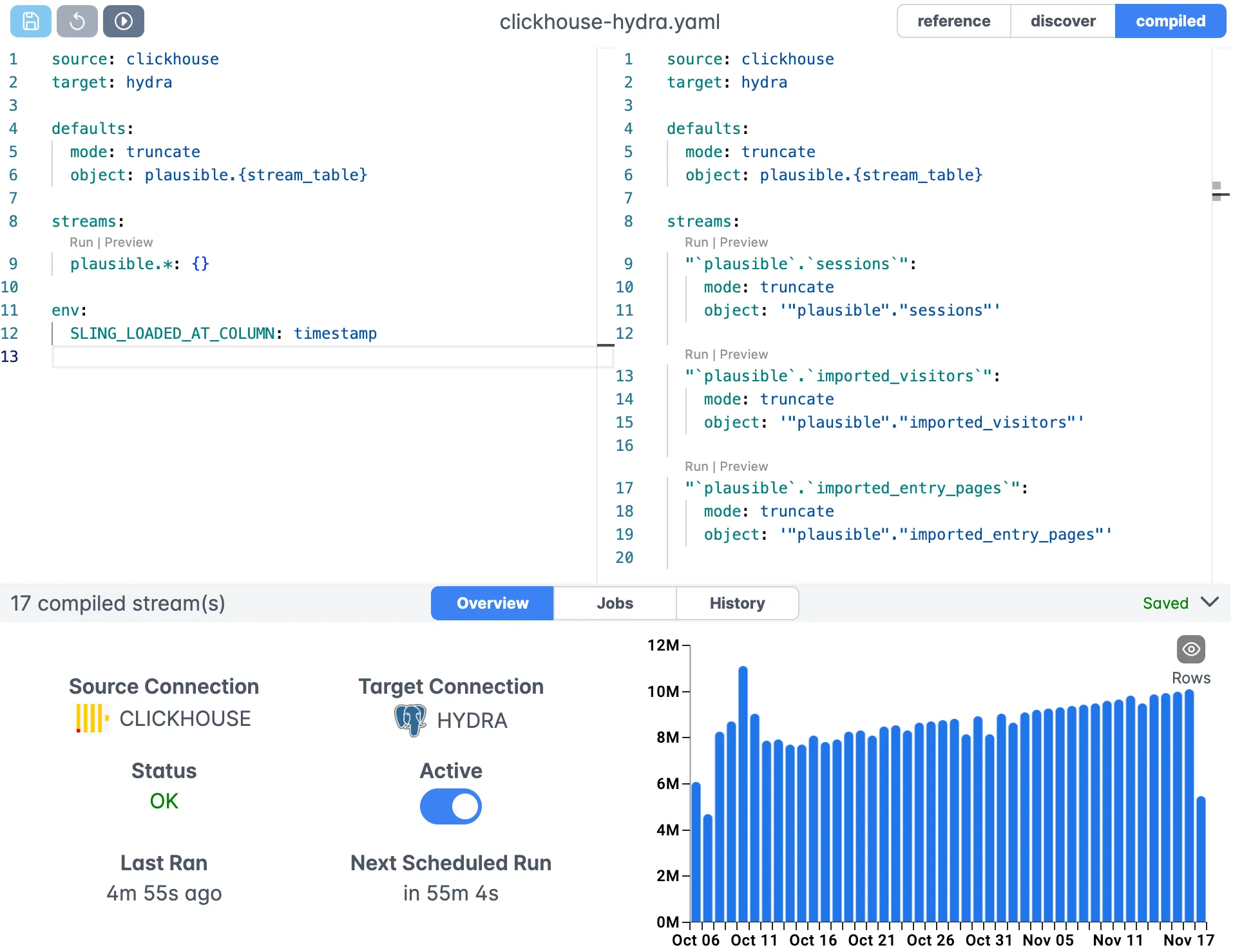
The web interface provides:
- Visual replication editor
- Real-time validation
- Syntax highlighting
- Auto-completion
- Version control integration
Connection Management
Manage all your connections in one place:
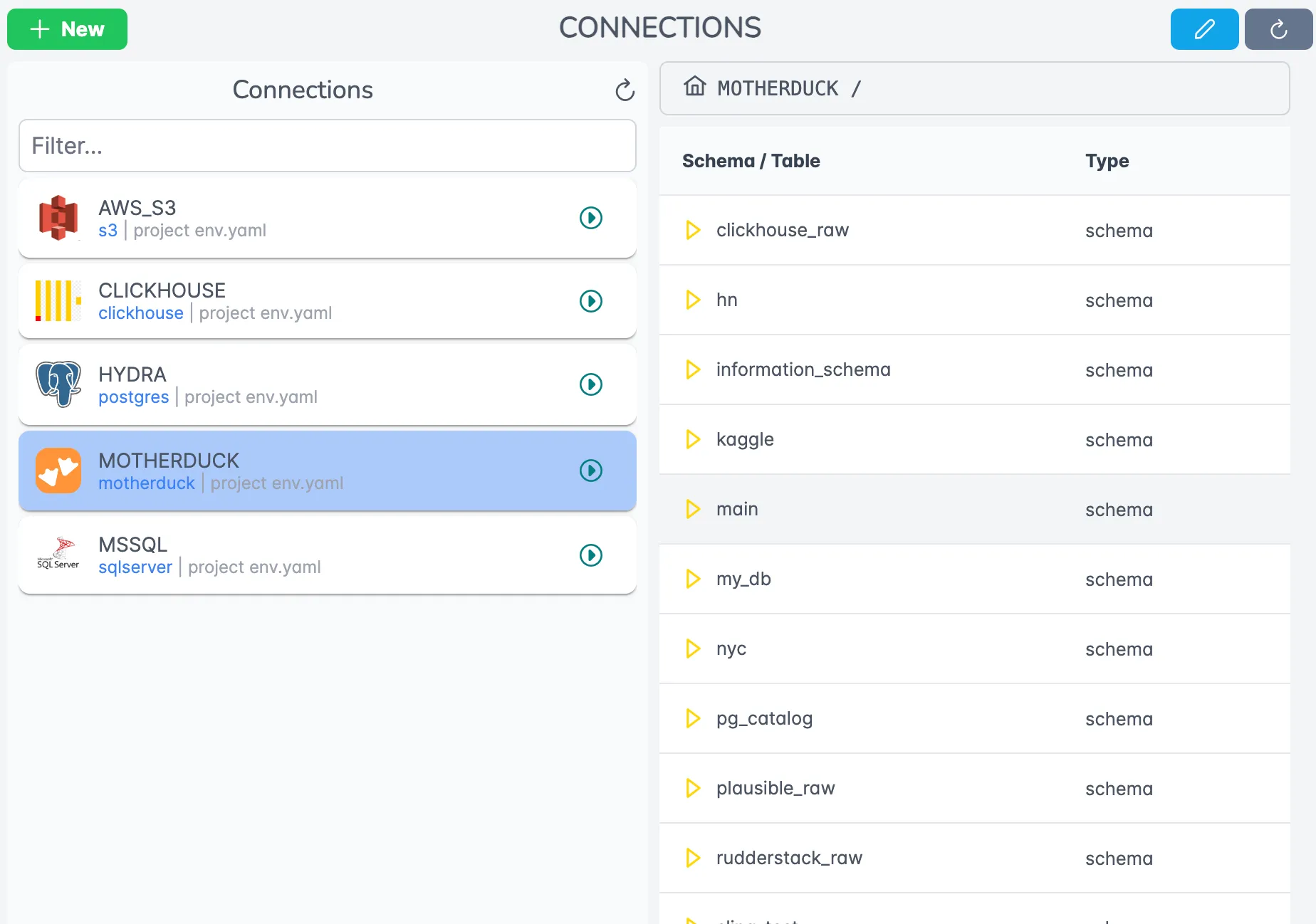
The platform offers:
- Centralized credential management
- Connection health monitoring
- Easy testing and validation
- Team access controls
Monitoring and Logging
Track your data operations in real-time:
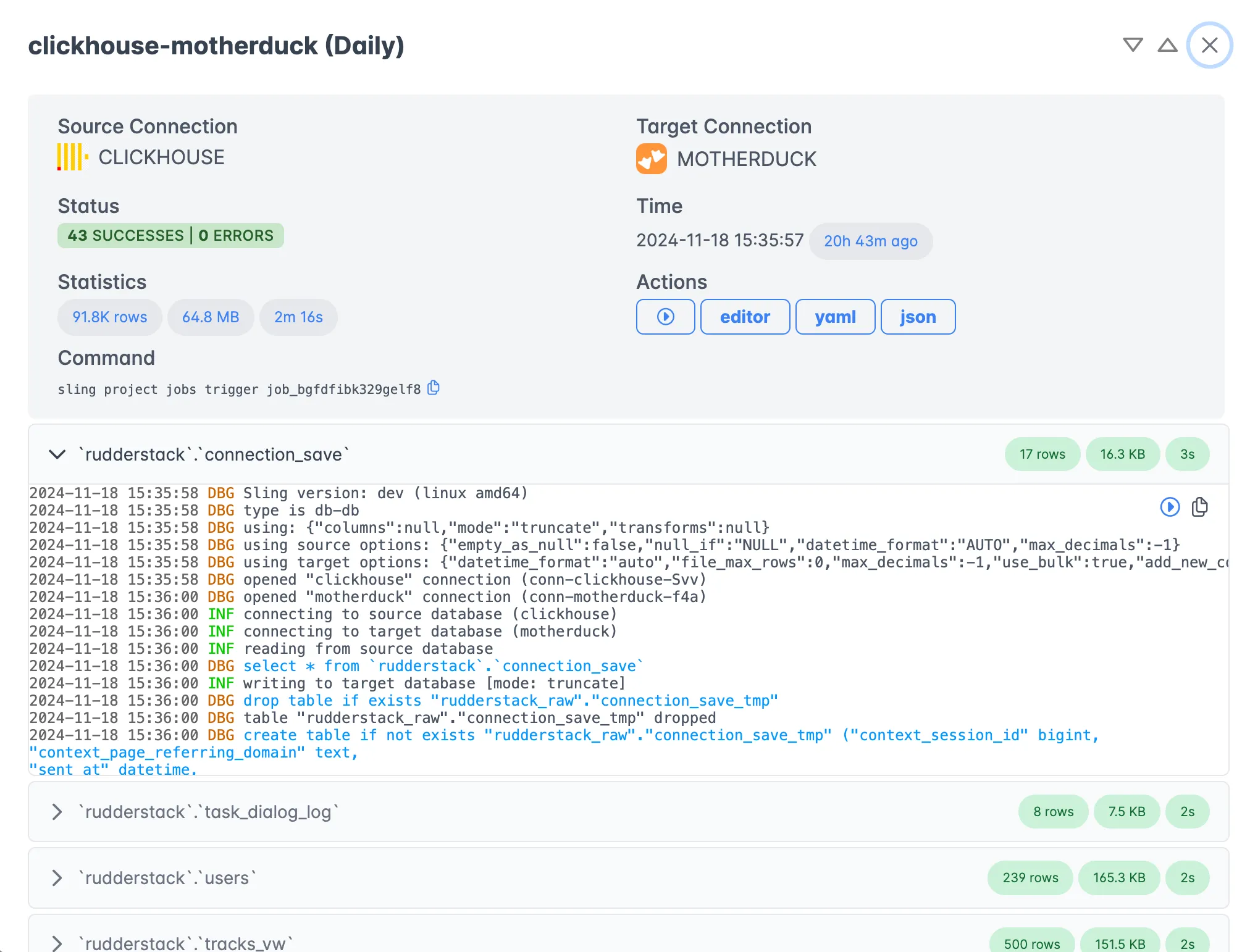
Features include:
- Real-time progress tracking
- Detailed execution logs
- Performance metrics
- Error reporting and alerts
For more information about the Sling Platform, visit:
Best Practices and Next Steps
Now that we’ve covered the various aspects of using Sling for PostgreSQL to DuckDB data replication, here are some recommended practices and next steps.
Best Practices
Start Small
- Begin with a simple table replication
- Test with a subset of your data
- Validate the results thoroughly
Optimize Performance
- Use appropriate batch sizes
- Consider incremental updates for large tables
- Monitor system resources
Maintain Security
- Use environment variables for credentials
- Implement proper access controls
- Regularly rotate credentials
Version Control
- Keep YAML configurations in version control
- Document your replication setup
- Track changes and updates
Additional Resources
To learn more about Sling and its capabilities:
Documentation
Examples
Community and Support
- Join our Discord community
- Report issues on GitHub
- Contact support at [email protected]
Next Steps
To continue your journey with Sling:
Explore Advanced Features
- Try different replication modes
- Experiment with transformations
- Test various source and target options
Scale Your Operations
- Move to YAML configurations for complex workflows
- Set up monitoring and alerting
- Implement proper error handling
Consider Platform
- Evaluate the Sling Platform for enterprise needs
- Set up agents for distributed processing
- Implement team collaboration workflows
Remember that Sling is continuously evolving with new features and improvements. Stay connected with the community to learn about updates and best practices as they emerge.
Related Guides
If you work with Postgres as a source, these guides cover related destinations and patterns:
- PostgreSQL to ClickHouse for an alternative analytical target.
- PostgreSQL to MotherDuck when you want the same DuckDB workflow in the cloud.
- Export PostgreSQL to Parquet files if you would rather land flat files than a database.
- Loading local Parquet into PostgreSQL for the reverse direction.
FAQ
Can Sling load a Postgres table into DuckDB without writing a schema first?
Yes. Sling reads the source table’s column types and creates the DuckDB table automatically on the first run, so you do not have to define the schema by hand.
Does DuckDB need to be running as a server for Sling to connect?
No. DuckDB is an embedded database, so the Sling connection just points at a local .duckdb file path. There is no server process to start or port to open.
How do I keep a DuckDB copy in sync with Postgres instead of reloading everything?
Use incremental mode with an update_key such as updated_at and a primary key under table_keys. Sling then pulls only rows newer than the last run and merges them into the DuckDB table.
Can I run a SQL query against Postgres and land the result in DuckDB?
Yes. Pass the SQL statement directly as the value of --src-stream (or the sql: key in a YAML stream) and Sling will run it on Postgres and write the result set into your DuckDB object.
What happens when a new column shows up in the Postgres table?
If add_new_columns is enabled under target_options, Sling adds the new column to the DuckDB table on the next run instead of failing. Without it, the unexpected column raises an error.
Is there a row limit when moving data from Postgres to DuckDB?
There is no fixed limit. Sling streams data in batches, so memory use stays flat whether the table has thousands of rows or hundreds of millions.
How do I refresh the DuckDB copy on a schedule?
Run sling run -r from cron or another scheduler, or add the replication to the Sling Platform and set a cadence there. Combine it with incremental mode so each run only pulls new Postgres rows.
Can two processes read the DuckDB file while Sling is writing to it?
DuckDB allows one writer at a time on a file. Let the Sling load finish before other connections open the file for reads, or point readers at a copy to avoid a lock conflict.