



Introduction
Last updated: August 2026
Moving data from cloud storage to databases efficiently is a critical requirement in modern data architectures. Whether you’re building a data warehouse, performing analytics, or synchronizing data across systems, the ability to seamlessly transfer data from Amazon S3 to PostgreSQL is essential.
In this guide, we’ll explore how to use Sling, an open-source data movement tool, to streamline the process of loading Parquet files from Amazon S3 into PostgreSQL databases. Parquet, being a columnar storage format, offers excellent compression and query performance, making it a popular choice for data storage. However, loading Parquet data into PostgreSQL traditionally requires multiple tools and complex configurations.
We’ll cover everything from installation and connection setup to advanced data pipeline configurations, helping you build a robust and efficient data transfer solution.
Do You Even Need to Load It? Querying Parquet in S3 vs Loading to Postgres
Before setting up a pipeline, it’s worth asking whether you need one. Several engines read Parquet directly out of S3, and for a lot of analytical work that’s the shorter path. Loading into Postgres is the right call for a specific set of reasons — not by default.
| Query in place (DuckDB, Athena, ClickHouse) | Load into Postgres | |
|---|---|---|
| Setup | None beyond credentials | Connection plus a load pipeline |
| Cost model | Per query, scanned bytes | Storage plus compute you already run |
| Row-level updates | Not supported — files are immutable | Native UPDATE and DELETE |
| Indexes | None; relies on column pruning | B-tree, GIN, partial indexes |
| Joins to existing Postgres tables | Awkward, needs a federated setup | Ordinary SQL joins |
| Concurrency for app traffic | Poor — built for scans, not point lookups | Built for it |
| Freshness | Whatever is in the bucket | As fresh as your last sync |
Query in place when the data stays analytical and read-only. Load into Postgres when it needs to join against tables you already have, serve an application, or be updated.
Querying in place with DuckDB takes one statement:
-- Read Parquet straight from S3, no load step
SELECT status, count(*)
FROM read_parquet('s3://my-bucket/data/transactions.parquet')
GROUP BY status;
If that answers your question, you’re done. If you need those rows sitting next to your application tables — indexed, joinable, and updatable — that’s when the rest of this guide applies. Sling uses the same DuckDB engine under the hood, so a query you prototype above can become the source of a load with almost no change.
The Challenge of S3 to PostgreSQL Data Transfer
Traditional approaches to moving Parquet data from S3 to PostgreSQL involve multiple steps and tools, creating complexity and potential points of failure. Let’s look at some common challenges:
Multiple Tools and Dependencies
A typical data pipeline might require:
- AWS CLI or SDK for S3 access
- Apache Arrow or PyArrow for Parquet processing
- PostgreSQL client libraries
- Custom scripts to orchestrate the process
- Additional tools for monitoring and error handling
Sling’s Solution
Sling addresses these challenges by providing:
- A single tool for end-to-end data transfer
- Built-in connection management for both S3 and PostgreSQL
- Efficient Parquet processing with minimal memory footprint
- Automatic schema mapping and type conversion
- Robust error handling and recovery mechanisms
- Progress tracking and monitoring capabilities
In the following sections, we’ll explore how to leverage Sling’s features to build a reliable and efficient data pipeline from S3 to PostgreSQL.
Getting Started with Sling
Let’s begin by installing Sling on your system. Sling provides multiple installation methods to suit different environments and preferences.
Installation Options
Choose the installation method that best fits your environment:
# macOS / Linux
curl -fsSL https://slingdata.io/install.sh | bash

# Windows
irm https://slingdata.io/install.ps1 | iex

# Python
pip install sling
For more detailed installation instructions, visit the Sling CLI Getting Started Guide.
Verifying Installation
After installation, verify that Sling is properly installed by checking its version:
# Check Sling version
sling --version
Understanding Sling Components
Sling consists of two main components:
Sling CLI: A powerful command-line tool that you’ve just installed, perfect for:
- Local development and testing
- CI/CD pipeline integration
- Quick data transfers
- Automated workflows
Sling Platform: A web-based interface offering:
- Visual pipeline creation
- Connection management
- Job monitoring
- Team collaboration
- Scheduling capabilities
In this guide, we’ll focus primarily on using the CLI for S3 to PostgreSQL transfers, but we’ll also touch on the platform features that can enhance your data pipeline management.
Setting Up Connections
Before we can start transferring data, we need to configure our source (S3) and target (PostgreSQL) connections. Sling provides multiple ways to manage connections securely.
Setting Up S3 Connection
You can configure your S3 connection using any of these methods:
Using sling conns set Command
# Set up S3 connection using AWS credentials
sling conns set S3 type=s3 access_key_id=YOUR_ACCESS_KEY secret_access_key=YOUR_SECRET_KEY region=us-east-1

# Or use a connection URL
sling conns set S3 url="s3://access_key:secret_key@bucket?region=us-east-1"
Using Environment Variables
# Set S3 connection using environment variables
export AWS_ACCESS_KEY_ID=YOUR_ACCESS_KEY
export AWS_SECRET_ACCESS_KEY=YOUR_SECRET_KEY
export AWS_REGION=us-east-1
Using Sling Environment File
Create or edit ~/.sling/env.yaml:
connections:
  S3:
    type: s3
    access_key_id: YOUR_ACCESS_KEY
    secret_access_key: YOUR_SECRET_KEY
    region: us-east-1
    # Optional settings
    endpoint: https://s3.amazonaws.com  # For custom endpoints
    bucket: your-bucket-name  # Default bucket
For more details about S3 connection configuration, visit the S3 Connection Documentation.
Setting Up PostgreSQL Connection
Similarly, configure your PostgreSQL connection:
Using sling conns set Command
# Set up PostgreSQL connection using individual parameters
sling conns set POSTGRES type=postgres host=localhost user=myuser database=mydb password=mypassword port=5432

# Or use a connection URL
sling conns set POSTGRES url="postgresql://myuser:mypassword@localhost:5432/mydb"
Using Environment Variables
# Set PostgreSQL connection using environment variable
export POSTGRES='postgresql://myuser:mypassword@localhost:5432/mydb'
Using Sling Environment File
Add to your ~/.sling/env.yaml:
connections:
  POSTGRES:
    type: postgres
    host: localhost
    user: myuser
    password: mypassword
    port: 5432
    database: mydb
    schema: public  # optional
For more details about PostgreSQL connection configuration, visit the PostgreSQL Connection Documentation.
Verifying Connections
After setting up your connections, verify them using Sling’s connection management commands:
# List all configured connections
sling conns list

# Test S3 connection
sling conns test S3

# Test PostgreSQL connection
sling conns test POSTGRES

# List available objects in S3
sling conns discover S3
These commands help ensure your connections are properly configured before attempting any data transfers.
Basic Data Transfer with CLI Flags
The quickest way to start transferring data from S3 to PostgreSQL is using Sling’s CLI flags. This method is perfect for simple transfers and testing your setup.
Simple Transfer Example
Here’s a basic example of transferring a single Parquet file from S3 to a PostgreSQL table:
# Transfer a single Parquet file to PostgreSQL
sling run \
  --src-conn S3 \
  --src-stream "s3://my-bucket/data/users.parquet" \
  --tgt-conn POSTGRES \
  --tgt-object "public.users"
Transfer with Options
You can customize the transfer behavior using source and target options:
# Transfer with custom options
sling run \
  --src-conn S3 \
  --src-stream "s3://my-bucket/data/*.parquet" \
  --src-options '{ "empty_as_null": true }' \
  --tgt-conn POSTGRES \
  --tgt-object "public.{stream_file_name}" \
  --tgt-options '{ "column_casing": "snake", "add_new_columns": true }'
In this example:
empty_as_null: Treats empty values as NULL in the source datacolumn_casing: Converts column names to snake_case in PostgreSQLadd_new_columns: Automatically adds new columns if they appear in the source data{stream_file_name}: A runtime variable that uses the source file name as the target table name
Advanced CLI Usage
Here are more examples showcasing different CLI features:
Filtering and Transforming Data
# Use custom sql (powered by DuckDB)
sling run \
  --src-conn S3 \
  --src-stream "select id, amount, date, replace(name, '-', '_') as name
    from read_parquet('s3://my-bucket/data/transactions.parquet')
    where unit not in ('single')" \
  --tgt-conn POSTGRES \
  --tgt-object "analytics.transactions" \
  --tgt-options '{ "table_keys": { "primary": ["id"] } }'
Handling Multiple Files
# Transfer multiple Parquet files with pattern matching
sling run \
  --src-conn S3 \
  --src-stream "s3://my-bucket/data/2024/*.parquet" \
  --tgt-conn POSTGRES \
  --tgt-object "raw.events" \
  --mode incremental \
  --tgt-options '{ "table_ddl": "create table if not exists raw.events (id int, event_type text, timestamp timestamptz)" }'
Setting Load Mode
# Full refresh mode with pre-SQL
sling run \
  --src-conn S3 \
  --src-stream "s3://my-bucket/daily/users.parquet" \
  --tgt-conn POSTGRES \
  --tgt-object "public.users" \
  --mode full-refresh
For more details about CLI flags and options, visit the CLI Flags Documentation.
Advanced Data Transfer with Replication YAML
While CLI flags are great for quick transfers, YAML-based replication configurations offer more control and are better suited for production environments. They allow you to define complex data pipelines with multiple streams, transformations, and options.
Basic YAML Configuration
Let’s start with a simple example. Create a file named s3_to_postgres.yaml:
source: S3
target: POSTGRES

defaults:
  mode: full-refresh
  target_options:
    add_new_columns: true
    column_casing: snake

streams:
  # Single file transfer
  s3://my-bucket/data/users.parquet:
    object: public.users
    primary_key: [id]
    columns:
      id: int
      name: string
      email: string
      created_at: timestamp
Run the replication with:
# Execute the replication
sling run -r s3_to_postgres.yaml
Advanced YAML Configuration
Here’s a more complex example showcasing various features:
source: S3
target: POSTGRES

defaults:
  mode: incremental
  source_options:
    empty_as_null: true
  target_options:
    add_new_columns: true
    column_casing: snake
    table_keys:
      primary: [id]
      unique: [email]

env:
  DATA_DATE: '2024-01-06'

streams:
  # Multiple files with pattern matching
  "users/*.parquet":
    object: raw.users_{stream_file_name}
    mode: full-refresh
    columns:
      id: int
      name: string
      email: string
      status: string
      created_at: timestamp

  # Daily data with runtime variables
  "daily/{DATA_DATE}/transactions.parquet":
    object: analytics.daily_transactions
    mode: incremental
    primary_key: [transaction_id]
    update_key: updated_at
    columns:
      transaction_id: string
      user_id: int
      amount: decimal
      status: string
      created_at: timestamp
      updated_at: timestamp
    target_options:
      table_ddl: |
        create table if not exists analytics.daily_transactions (
          transaction_id text primary key,
          user_id int,
          amount decimal,
          status text,
          created_at timestamptz,
          updated_at timestamptz
        )

  # Multiple files with transformations
  "events/**/*.parquet":
    object: analytics.events
    mode: incremental
    single: true
    columns:
      event_id: string
      event_type: string
      user_id: int
      properties: json
      timestamp: timestamp
    target_options:
      batch_limit: 10000
      table_keys:
        primary: [event_id]
Let’s break down the key features in this configuration:
Environment Variables
env:
  DATA_DATE: '2024-01-06'
  BUCKET_NAME: my-bucket
These variables can be referenced in stream configurations using ${VAR_NAME} syntax.
Default Options
defaults:
  mode: incremental
  source_options:
    empty_as_null: true
  target_options:
    add_new_columns: true
    column_casing: snake
These settings apply to all streams unless overridden.
Stream Configurations
Pattern Matching:
"users/*.parquet":
  object: raw.users_{stream_file_name}
Uses wildcards to match multiple files and runtime variables for dynamic table names.
Incremental Loading:
mode: incremental
primary_key: [transaction_id]
update_key: updated_at
Configures incremental loading based on an update key.
Schema Definition:
columns:
  transaction_id: string
  amount: decimal
Explicitly defines column types.
Table Creation:
target_options:
  table_ddl: |
    create table if not exists...
Automatically creates tables with specific schemas.
Data Transformations:
transforms:
  properties: parse_json
  timestamp: to_timestamp
Applies transformations to specific columns.
For more details about replication configuration, visit:
- Replication Structure Documentation
- Source Options Documentation
- Target Options Documentation
- Runtime Variables Documentation
Parquet vs CSV for S3 Data Loads
If you control how files land in S3, the format choice shapes everything downstream. Parquet and CSV behave very differently once a bucket grows past a few gigabytes.
| Parquet | CSV | |
|---|---|---|
| Layout | Columnar | Row-oriented text |
| Schema | Embedded in the file | None — inferred or declared |
| Types | Preserved (int, decimal, timestamp) | Everything is a string |
| Compression | Built in, per column | External only (gzip the whole file) |
| Typical size | 5–10× smaller than raw CSV | Baseline |
| Partial reads | Reads only the columns you ask for | Scans every byte of every row |
| Human-readable | No | Yes |
| Appending | Write a new file | Append to the existing file |
For a Postgres load, the type preservation matters more than the size savings. A CSV column of 2024-01-06 is just text, so something has to decide whether it becomes date, timestamp, or varchar. That guess is where load bugs come from. Parquet carries the type in the file, so Sling maps it without inference.
CSV still earns its place for small handoffs, systems that emit nothing else, and anything a human needs to open and read. Past roughly a gigabyte, Parquet wins on nearly every axis. If your source is CSV, the S3 CSV to PostgreSQL guide covers that path directly.
Compression Choices
Parquet compresses per column, which is why it shrinks so well — a column of repeated status values collapses far better than the same values scattered across CSV rows. Sling accepts auto, none, zip, gzip, snappy, and zstd:
source: S3
target: POSTGRES

defaults:
  source_options:
    compression: zstd

streams:
  "data/*.parquet":
    object: public.events
Snappy is the common default and decompresses fastest. zstd produces meaningfully smaller files for a modest CPU cost, which usually pays for itself when files travel from S3 over the network. auto lets Sling infer the codec from the file, which is the right choice when you’re reading files somebody else wrote.
Loading Partitioned Parquet from S3
Most real S3 Parquet layouts are partitioned by date, region, or tenant in Hive style:
s3://my-bucket/events/year=2024/month=01/day=06/part-0000.parquet
s3://my-bucket/events/year=2024/month=01/day=07/part-0000.parquet
Use a recursive wildcard to match across partition directories, and single: true so every matched file lands in one Postgres table rather than one table per file:
source: S3
target: POSTGRES

streams:
  "events/**/*.parquet":
    object: analytics.events
    single: true
    mode: incremental
    primary_key: [event_id]
    update_key: created_at
One thing to watch: the partition values live in the directory path, not inside the Parquet files, so they don’t automatically become columns. When you need year and month as real columns, select them explicitly through a DuckDB query:
sling run \
  --src-conn S3 \
  --src-stream "select *, year, month, day
    from read_parquet('s3://my-bucket/events/**/*.parquet', hive_partitioning = true)" \
  --tgt-conn POSTGRES \
  --tgt-object "analytics.events"
To load one partition at a time — the usual pattern for a daily job — put the date in an env block and reference it as a runtime variable:
source: S3
target: POSTGRES

env:
  LOAD_DATE: '2024-01-06'

streams:
  "events/{LOAD_DATE}/*.parquet":
    object: analytics.events
    single: true
    mode: incremental
    primary_key: [event_id]
How Parquet Types Map to PostgreSQL
Because Parquet carries its own schema, Sling translates types without inference. Each Parquet type maps to a Sling general type, which then maps to a Postgres native type:
| Parquet type | Sling general type | PostgreSQL type |
|---|---|---|
BOOLEAN | bool | bool |
INT32 | integer | integer |
INT64 | bigint | bigint |
FLOAT / DOUBLE | float | double precision |
DECIMAL | decimal | numeric |
BYTE_ARRAY (UTF8) | string | varchar() |
BYTE_ARRAY (long text) | text | text |
BYTE_ARRAY (raw) | binary | bytea |
DATE | date | date |
TIMESTAMP | timestamp | timestamp |
TIMESTAMP (UTC) | timestampz | timestamptz |
TIME | time | time(6) |
| Nested struct / list | json | jsonb |
| UUID logical type | uuid | uuid |
Two rows on that table cause most of the surprises. Nested Parquet structures land in a jsonb column, so they stay queryable with Postgres JSON operators instead of being flattened away. Timezone-aware timestamps become timestamptz while naive ones become plain timestamp. If you find times shifting after a load, that distinction is almost always why.
Override any mapping with an explicit columns block when the default isn’t what you want:
streams:
  "data/transactions.parquet":
    object: analytics.transactions
    columns:
      amount: 'decimal(18,4)'
      metadata: json
Using the Sling Platform
While the CLI is powerful for local development and automation, the Sling Platform provides a user-friendly web interface for managing your data pipelines. It offers features like visual pipeline creation, monitoring, and team collaboration.
Visual Pipeline Editor
The Sling Platform includes a visual editor for creating and managing your data pipelines:
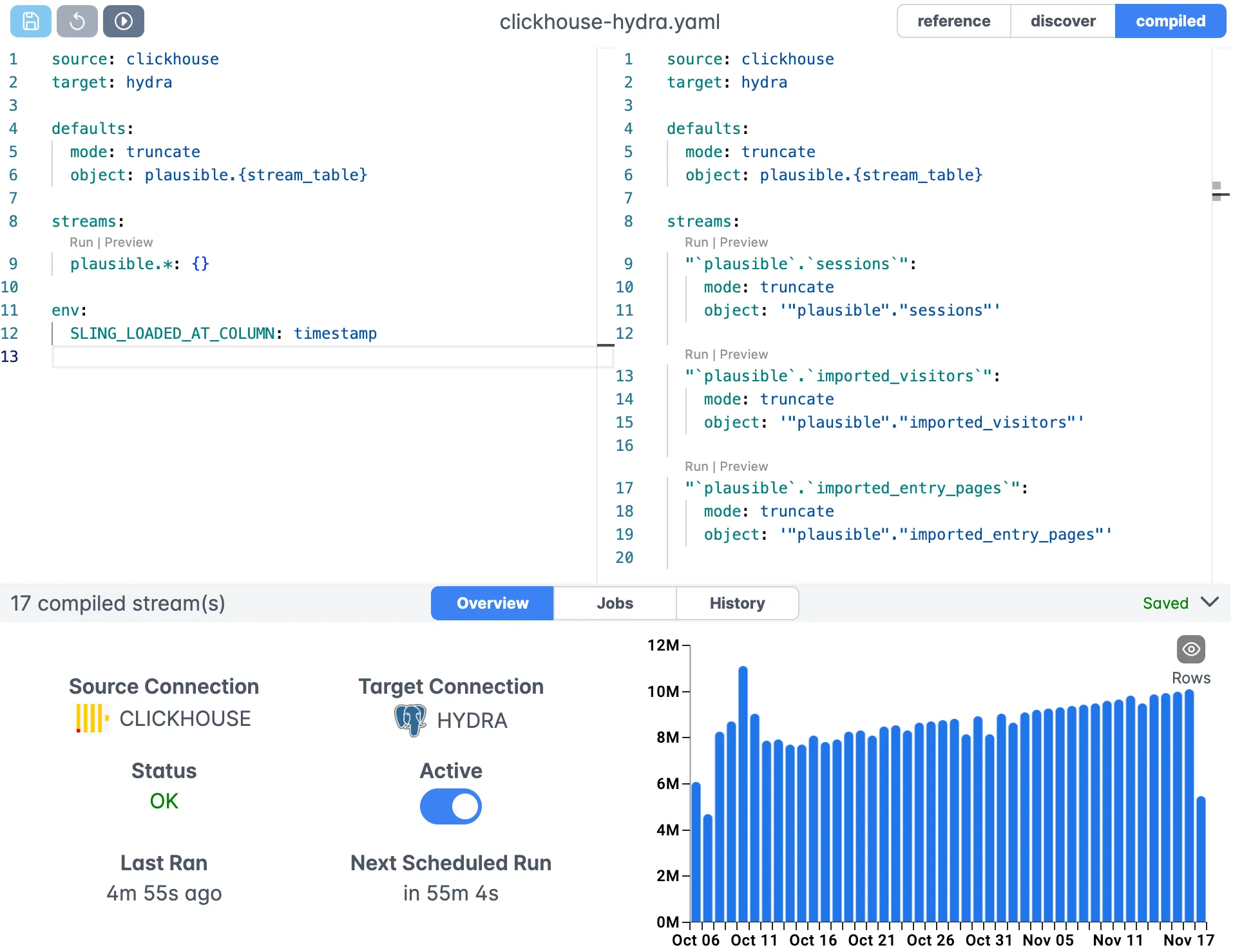
Key features of the editor include:
- Visual stream configuration
- Syntax highlighting for YAML
- Real-time validation
- Connection management
- Version control integration
Execution Monitoring
Monitor your data transfers in real-time with detailed progress and performance metrics:
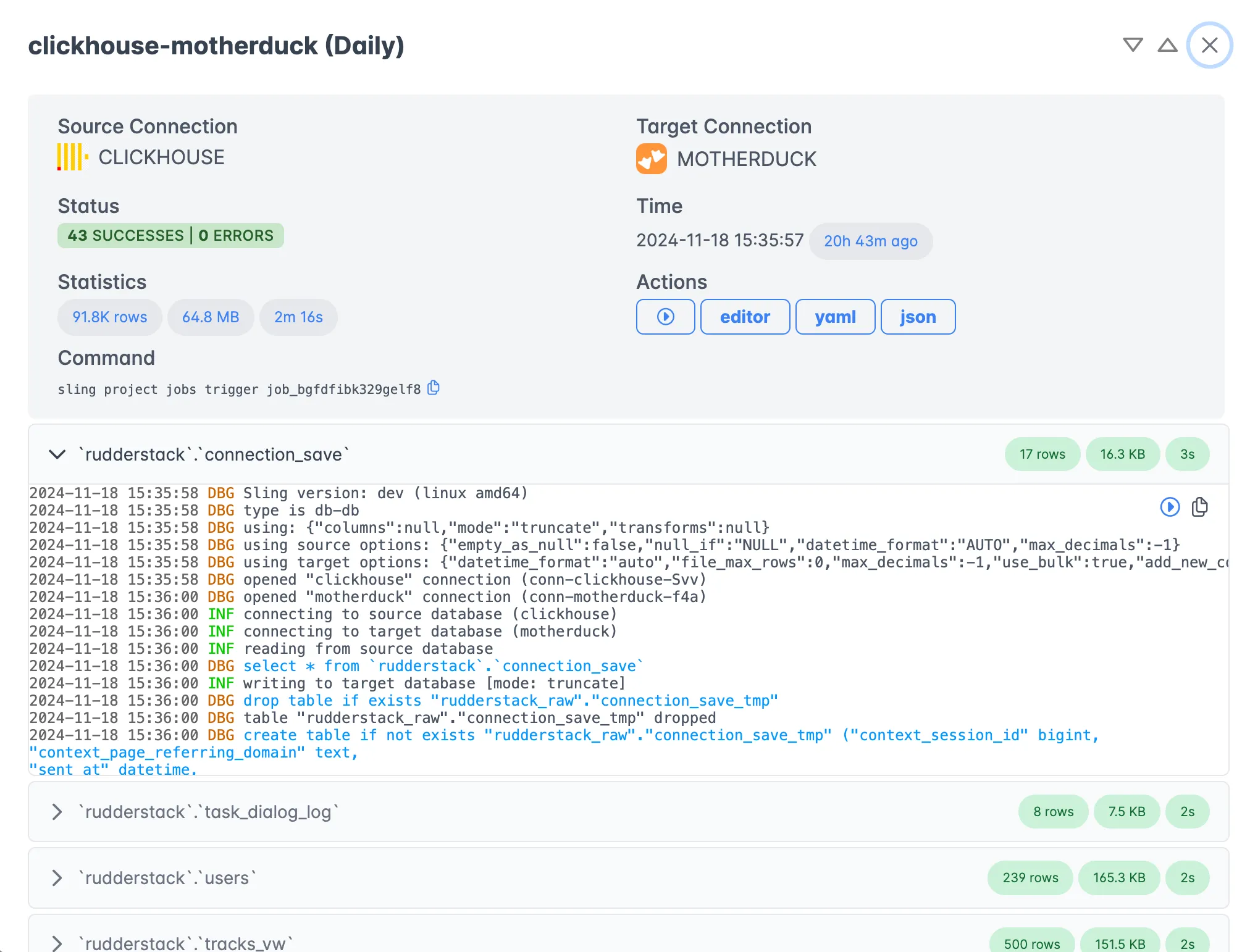
The execution view provides:
- Real-time progress tracking
- Detailed performance metrics
- Error reporting and logs
- Historical execution data
- Resource utilization stats
Platform Benefits
The Sling Platform offers several advantages over CLI-only usage:
Team Collaboration
- Shared connection management
- Role-based access control
- Pipeline version history
- Collaborative debugging
Monitoring and Alerting
- Real-time pipeline status
- Performance metrics
- Error notifications
- Custom alerts
Scheduling and Orchestration
- Visual schedule creation
- Dependency management
- Retry configurations
- Event-based triggers
Enterprise Features
- Audit logging
- Resource management
- SLA monitoring
- Support for multiple environments
Getting Started with the Platform
To start using the Sling Platform:
- Sign up at app.slingdata.io
- Create your organization
- Install and configure Sling agents
- Set up your connections
- Create your first pipeline
For more details about the platform features, visit the Sling Platform Documentation.
Getting Help and Next Steps
Now that you’ve learned how to use Sling for transferring Parquet data from S3 to PostgreSQL, here are some resources and next steps to help you get the most out of Sling.
Documentation Resources
- Sling CLI Documentation - Detailed CLI usage and examples
- Sling Platform Documentation - Platform features and guides
- Replication Documentation - In-depth replication concepts
- Connection Documentation - Connection configuration guides
Example Use Cases
Explore more Sling examples:
Best Practices
Connection Management
- Use environment variables for sensitive credentials
- Regularly rotate access keys
- Follow the principle of least privilege
Performance Optimization
- Use appropriate batch sizes
- Configure compression settings
- Monitor resource utilization
Error Handling
- Implement proper logging
- Set up alerts for failures
- Plan for recovery scenarios
Maintenance
- Keep Sling updated
- Monitor disk space
- Clean up temporary files
For more examples and detailed documentation, visit docs.slingdata.io.
Related Guides
These guides cover related S3 and Postgres workflows:
- Moving CSV data from S3 to PostgreSQL when your files are CSV instead of Parquet.
- Export PostgreSQL to S3 as Parquet for the reverse direction.
- Loading local Parquet into PostgreSQL when the files live on disk rather than in S3.
- Import SFTP files into PostgreSQL if your source is an SFTP server.
- Export PostgreSQL to Parquet for a deeper look at Parquet compression and partitioning options.
- Query Parquet with DuckDB when you’d rather analyze the files in place than load them.
FAQ
Does Sling read Parquet files from S3 directly, or do I need to download them first?
Sling reads the Parquet files straight from S3. You point --src-stream at the s3:// path and Sling streams the data into Postgres without staging it on local disk.
How do I load every Parquet file in an S3 prefix at once?
Use a wildcard in the stream path, such as s3://my-bucket/data/*.parquet. Sling matches all files under that prefix and loads them into the target table.
Can I combine several Parquet files into a single Postgres table?
Yes. Set single: true on the stream so Sling treats the matched files as one dataset and writes them into one table instead of creating a table per file.
Do I have to define Postgres column types when loading Parquet?
No. Parquet carries its own schema, so Sling maps those types to Postgres automatically. You can still pin specific types with a columns block when you want to override the inferred mapping.
How does Sling avoid duplicate rows when I reload the same files?
Run the stream in incremental mode with a primary key set under table_keys and an update_key. Sling upserts on the key so re-running the load updates existing rows rather than inserting copies.
Can I filter or transform the Parquet data before it reaches Postgres?
Yes. Sling can run a DuckDB-powered SQL query over the Parquet source, so you can select columns, rename fields, or filter rows in the same step that loads them.
Do I need to load Parquet into Postgres at all, or can I query it directly in S3?
You can query it in place. DuckDB, Athena, and ClickHouse all read Parquet straight from S3, which suits exploratory and infrequent analysis. Load into Postgres when you need row-level updates, transactional reads, indexes, or joins against data that already lives in Postgres.
Should I store the data as Parquet or CSV on S3?
Parquet for anything analytical. It is columnar and typed, so a query touching three columns reads only those three, and the file carries its own schema. CSV is untyped text and every read scans the whole row, but it stays useful for small one-off handoffs and systems that accept nothing else.
How does Sling handle Hive-style partitioned Parquet directories?
Point the stream at a recursive wildcard such as s3://my-bucket/events/**/*.parquet and set single: true so every matched file lands in one table. Partition values encoded in the directory path are not automatically promoted to columns, so select them explicitly in a DuckDB query if you need them.
Which Parquet compression codecs does Sling support?
Sling accepts auto, none, zip, gzip, snappy, and zstd via the compression option. Snappy is the usual default and decompresses fastest; zstd produces noticeably smaller files at a modest CPU cost, which pays off when files cross the network from S3.