



Last updated: August 2026
MySQL synchronization means different things to different teams. Some need to keep two MySQL servers in step (prod to dev, region to region). Others need to move MySQL data into a different engine like PostgreSQL for analytics or reporting. Sling handles both from a single YAML file, on a schedule, without triggers, replication slots, or a Kafka cluster.
This guide covers both paths. First, the quick answer for MySQL to MySQL synchronization and how it compares to native MySQL replication. Then the main focus: cross-engine sync from MySQL to PostgreSQL, which is the harder problem because it also needs type mapping and schema drift handling.
With Sling, you declare source, target, and sync mode in a simple YAML file and run it on any scheduler. The same tool covers MySQL to MySQL, MySQL to Postgres, and 40+ other connectors, so you learn one config format instead of one tool per database pair.
MySQL to MySQL Synchronization with Sling
If both sides are MySQL, the sync is even simpler than the cross-engine case, because there is no type translation to worry about. You point Sling at a source MySQL connection and a target MySQL connection, and run it on a schedule.
source: mysql_prod
target: mysql_replica

defaults:
  mode: incremental
  target_options:
    add_new_columns: true

streams:
  'app.*':
    object: 'app.{stream_table}'
    primary_key: [id]
    update_key: updated_at
Run it the same way as any other replication:
sling run -r mysql_to_mysql.yaml
Because both engines are MySQL, native types round-trip cleanly. A TINYINT(1) stays a TINYINT(1), a JSON column stays JSON, and DATETIME stays DATETIME. You skip the boolean and JSONB re-mapping you hit when the target is Postgres. That makes MySQL to MySQL the lowest-friction sync Sling does.
When to use native MySQL replication instead
Sling’s polling model is not always the right tool for MySQL to MySQL. Reach for native MySQL replication (binlog-based primary/replica or Group Replication) when you need:
- Sub-second lag. Native replication streams the binlog continuously; polling cannot match that.
- Automatic failover. A replica can be promoted to primary; a Sling job cannot.
- Byte-for-byte fidelity, including hard deletes, which polling by
update_keydoes not capture.
Reach for Sling when you need:
- A subset of tables or schemas, not the whole server, filtered declaratively in YAML.
- Scheduled snapshots for dev, staging, or reporting, where minutes of lag are fine.
- The same tool to also cover MySQL to Postgres, Snowflake, or S3 later.
For the canonical native reference, see the MySQL replication documentation and Group Replication. If you need warehousing or analytics rather than a hot standby, keep reading. The incremental-polling approach below fits that job better than replication does.
Choosing a MySQL Synchronization Tool
Teams searching for a mysql sync tool land on a wide field. Here is how the common options compare, so you can match the tool to the job rather than the other way around.
| Tool | Best for | Sync style | Runs on a schedule? |
|---|---|---|---|
| Native MySQL replication | MySQL to MySQL hot standby, failover | Continuous binlog stream | Always on |
| MySQL Workbench / dbForge Data Compare | One-off schema or row diff-and-sync between MySQL servers | Manual diff + apply | No (GUI, ad-hoc) |
mysqldump + import | One-shot full copy, backups | Bulk snapshot | Only via your own cron |
| Debezium + Kafka | Real-time change-data-capture, any target | Streaming CDC | Always on |
| pgloader | One-shot MySQL to PostgreSQL migration | Bulk load, then exits | No |
| Sling (this guide) | Scheduled MySQL to MySQL or MySQL to Postgres sync | Incremental polling | Yes, plain cron |
The GUI diff tools (Workbench synchronization, dbForge Data Compare) are excellent for a one-time reconciliation between two MySQL databases, but they are interactive by design and do not fit an unattended schedule. Native replication and Debezium sit at the always-on end and need binlog access plus operational care. Sling occupies the middle: a single binary you run on cron for repeatable incremental syncs, across MySQL to MySQL and cross-engine pairs alike.
Understanding Sling
Sling is built around two main components that work together seamlessly to provide a comprehensive data movement solution:
The CLI Tool
The Sling CLI is a powerful command-line tool that gives you direct control over your data operations. It’s perfect for:
- Local development and testing
- CI/CD pipeline integration
- Quick data transfers
- Automated workflows
With the CLI, you can manage connections, test configurations, and run replications with simple commands. It’s designed to be intuitive yet powerful, making it ideal for both development and production environments.
Getting Started with Sling
Getting Sling up and running is straightforward. Let’s start with installing the CLI tool, which we’ll use for our MySQL to PostgreSQL synchronization.
Installing the CLI
# macOS / Linux
curl -fsSL https://slingdata.io/install.sh | bash

# Windows
irm https://slingdata.io/install.ps1 | iex

# Python
pip install sling
Basic Setup Requirements
Before we begin synchronizing databases, ensure you have:
- Access credentials for both MySQL and PostgreSQL databases
- Network connectivity to both databases
- Basic understanding of the data you want to synchronize
Managing Connections
Sling provides an easy way to manage your database connections. You can set them up using environment variables or the CLI:
# Set MySQL connection
sling conns set mysql_source url='mysql://user:pass@host:3306/dbname'

# Test MySQL connection
sling conns test mysql_source

# Set PostgreSQL connection
sling conns set postgres_target url='postgres://user:pass@host:5432/dbname'

# Test PostgreSQL connection
sling conns test postgres_target
Once your connections are set up and tested, you’re ready to create your first replication configuration.
Creating the MySQL to PostgreSQL Replication
The heart of Sling’s functionality lies in its replication configuration. Let’s create a YAML file that defines how we want to sync data from MySQL to PostgreSQL.
Understanding the Configuration Structure
Create a file called mysql_to_postgres.yaml with the following structure:
# Define source and target connections
source: mysql_source
target: postgres_target

# Default settings for all streams
defaults:
  # Use incremental mode for efficient syncing
  mode: incremental
  # Configure target options
  target_options:
    # Automatically add new columns if they appear in source
    add_new_columns: true

# Define the tables to replicate
streams:
  # Use wildcard to replicate all tables with dynamic target object
  'mysql.*':
    # Target object using runtime variable
    object: 'public.{stream_table}'
    # Columns to use as primary key
    primary_key: [id]
    # Column to track updates
    update_key: updated_at
This configuration will maintain a continuous sync between your MySQL and PostgreSQL databases, ensuring data consistency while minimizing resource usage through incremental updates.
Running the Replication
With our configuration in place, we can now run the replication using the Sling CLI. There are several ways to do this, depending on your needs.
Basic Replication Run
The simplest way to run the replication is:
# Run the replication using the configuration file
sling run -r mysql_to_postgres.yaml
Monitoring Progress
As the replication runs, Sling provides detailed progress information:
- Number of records processed
- Transfer speed
- Estimated time remaining
- Any warnings or issues
Advanced Run Options
Sling offers several options to customize the replication run:
# Run specific streams only
sling run -r mysql_to_postgres.yaml --streams users

# Override the replication mode
sling run -r mysql_to_postgres.yaml --mode full-refresh
Why MySQL to PostgreSQL Is the Harder Sync
MySQL to MySQL database synchronization is symmetric: same types, same SQL dialect. Cross-engine sync from MySQL to PostgreSQL is harder because the two databases disagree on types and defaults. A working MySQL to Postgres sync has to handle three things that a same-engine sync does not:
- Type mapping.
TINYINT(1)boolean intent, MySQLJSONto PostgresJSONB, andDATETIMEprecision (covered in the type-mapping notes below). - Schema drift. New columns appearing on the source without breaking the run.
- An efficient incremental strategy that reads only changed rows and never touches the MySQL binlog.
The rest of this article is about that cross-engine case, which is what the configuration above already handles.
Sling vs pgloader for MySQL to PostgreSQL Migration
pgloader is the most well-known open-source MySQL-to-PostgreSQL migration tool, so it is worth saying directly when each tool fits.
Use pgloader when:
- You are doing a one-shot migration and want fast bulk load with sensible defaults.
- You want type-cast rules expressed in pgloader’s CAST DSL.
- You are migrating a database that will then be decommissioned, so ongoing sync is not a concern.
Use Sling when:
- You need a recurring sync, not a one-time copy.
- You want to define the pipeline in YAML and check it into Git, so changes are reviewable.
- You want incremental loading by
updated_ator a monotonic key, so each run is cheap. - You want the same tool to handle MySQL → Postgres today and Postgres → Snowflake (or any of 40+ other connectors) tomorrow.
In practice, many teams use both: pgloader for the initial cutover (fast bulk seed), then Sling on a schedule for ongoing incremental updates. Sling can also do the seed itself with mode: full-refresh on the first run. For a one-time move without the recurring sync, see the one-shot MySQL to Postgres migration guide.
If you are evaluating a mysql sync tool more broadly, the other common comparison points are AWS DMS (managed but Postgres-only on the target side and expensive), Airbyte (broader connector catalog but heavier to self-host), and Fivetran (managed SaaS, priced per row). Sling sits in the open-source-CLI-plus-optional-platform niche.
Incremental Sync vs CDC: When to Choose Each
The replication YAML above uses mode: incremental with update_key: updated_at. This is a polling approach: every run, Sling asks MySQL for rows where updated_at > last_high_watermark, copies them, and advances the watermark. It is simple, robust, and works against a plain read-only MySQL user.
The alternative is change-data-capture (CDC): tail the MySQL binlog and stream every insert/update/delete to Postgres as it happens.
| Property | Incremental Polling (Sling) | CDC (Debezium / others) |
|---|---|---|
| Latency | Polling interval (seconds to minutes) | Sub-second |
| MySQL setup | Just a read-only user | Binlog enabled, replication user, slot management |
| Deletes | Not captured unless soft-deleted | Captured natively |
| Backfill | Trivial: run with full-refresh once | Requires snapshot + catch-up logic |
| Operational cost | Cron + a CLI binary | Kafka cluster + Debezium connectors + offsets |
| Schema drift | Handled by add_new_columns: true | Connector-specific, often manual |
For analytics, warehousing, and most operational reporting, incremental polling is the right call: cheaper to run, easier to debug, no Kafka. Reach for CDC when you genuinely need sub-second latency or when you must capture hard deletes from the source.
If you do need deletes for an analytics use case, the common workaround is to add a soft-delete flag in MySQL and let Sling pick it up through update_key. That keeps the polling architecture and avoids standing up a streaming stack.
How MySQL Types Map to PostgreSQL
Most MySQL types have a direct Postgres equivalent, and Sling applies the mapping automatically. The table below shows the common cases. When the target is MySQL instead of Postgres, these types round-trip unchanged, which is why same-engine sync is simpler.
| MySQL source type | PostgreSQL target type | Notes |
|---|---|---|
INT, BIGINT | integer, bigint | Direct. |
VARCHAR(n), TEXT | varchar(n), text | Direct. |
DECIMAL(p,s) | numeric(p,s) | Precision and scale preserved. |
DATETIME, TIMESTAMP | timestamp | MySQL DATETIME is second-precise by default; Postgres stores microseconds. |
TINYINT(1) | smallint | Treated as boolean by many drivers; lands as smallint unless you cast. |
JSON | jsonb | MySQL JSON flows into queryable Postgres JSONB. |
BINARY, BLOB | bytea | Binary passthrough. |
If a mapping is wrong for your schema, override it per-column in the replication YAML under columns:. The two cases worth watching are TINYINT(1) (cast it to boolean if you want a real boolean in Postgres) and any DATETIME boundary collisions, since MySQL’s second precision can put two rows on the same update_key value.
Managing Replications via Sling Platform
While the CLI is perfect for development and simple workflows, the Sling Platform provides a comprehensive interface for managing replications at scale. Let’s explore how to manage our MySQL to PostgreSQL sync using the platform.
Creating Replications in the UI
The Sling Platform features a visual editor that makes it easy to:
- Create and modify replication configurations
- Validate settings in real-time
- Test connections directly
- Share configurations with team members
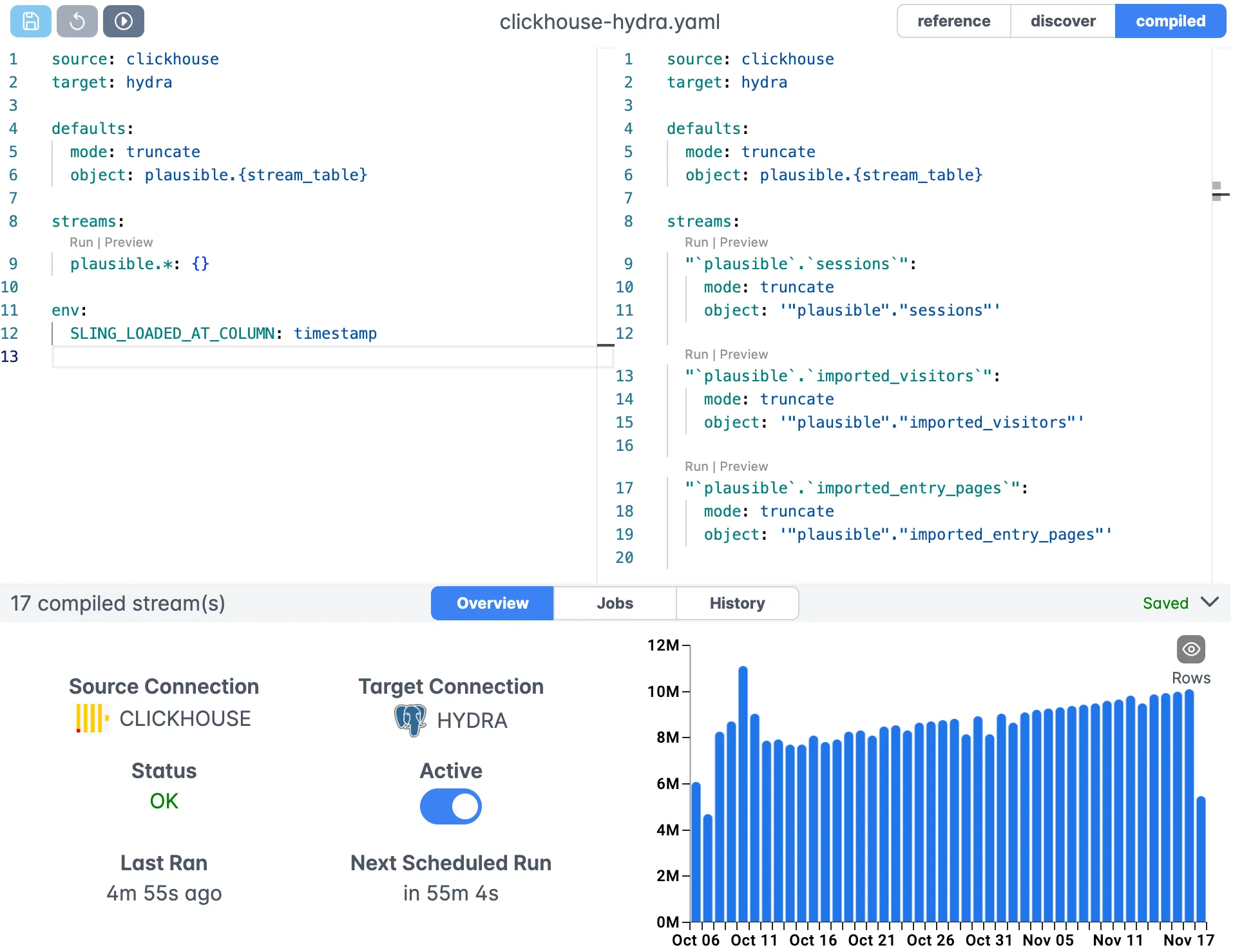
Monitoring and Scheduling
The platform provides robust monitoring capabilities:
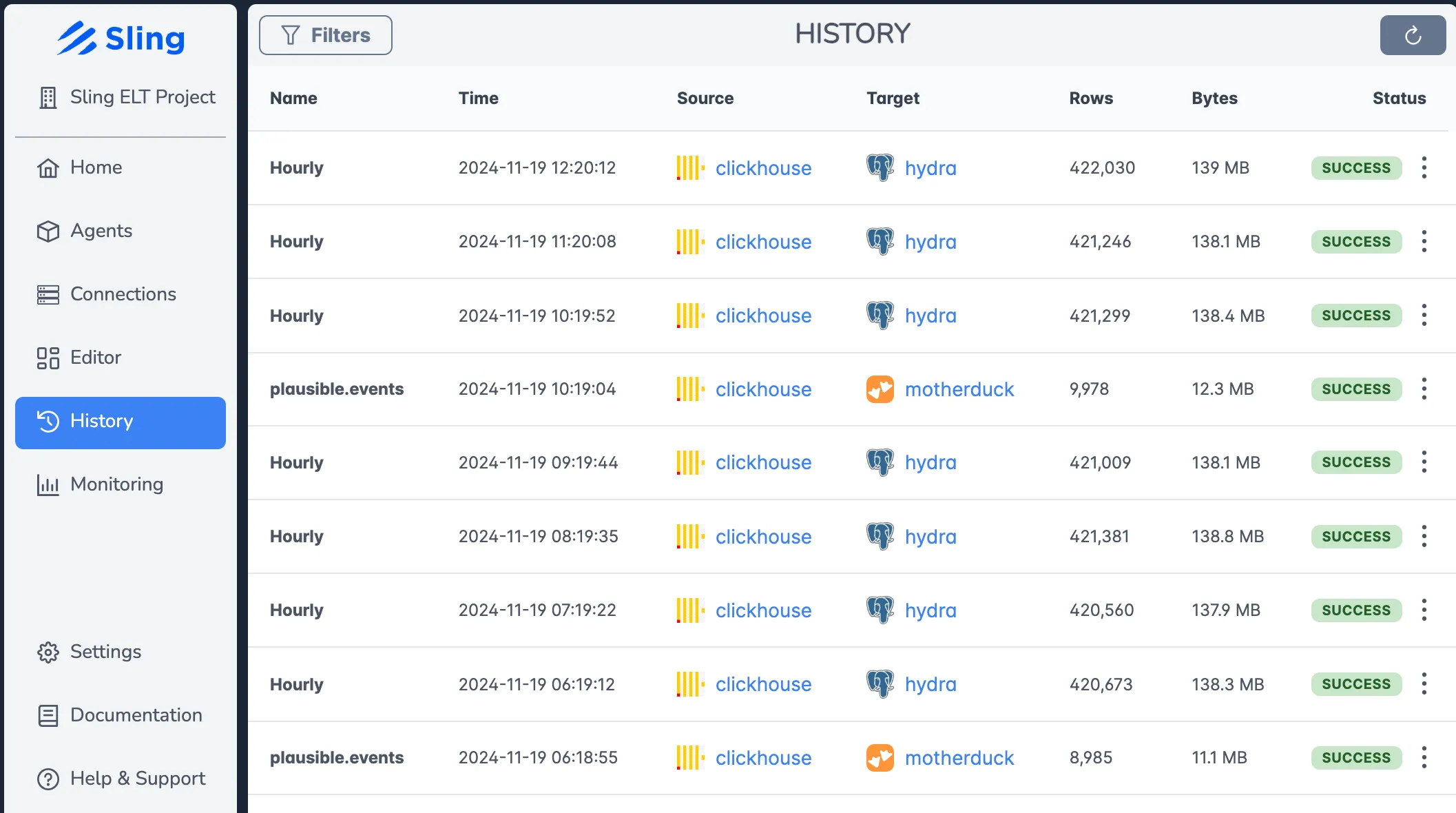
Key features include:
- Real-time execution monitoring
- Detailed job history
- Performance metrics
- Error tracking and alerts
- Scheduled runs with flexible timing
Agent Deployment
Sling Agents are the workers that execute your replications:
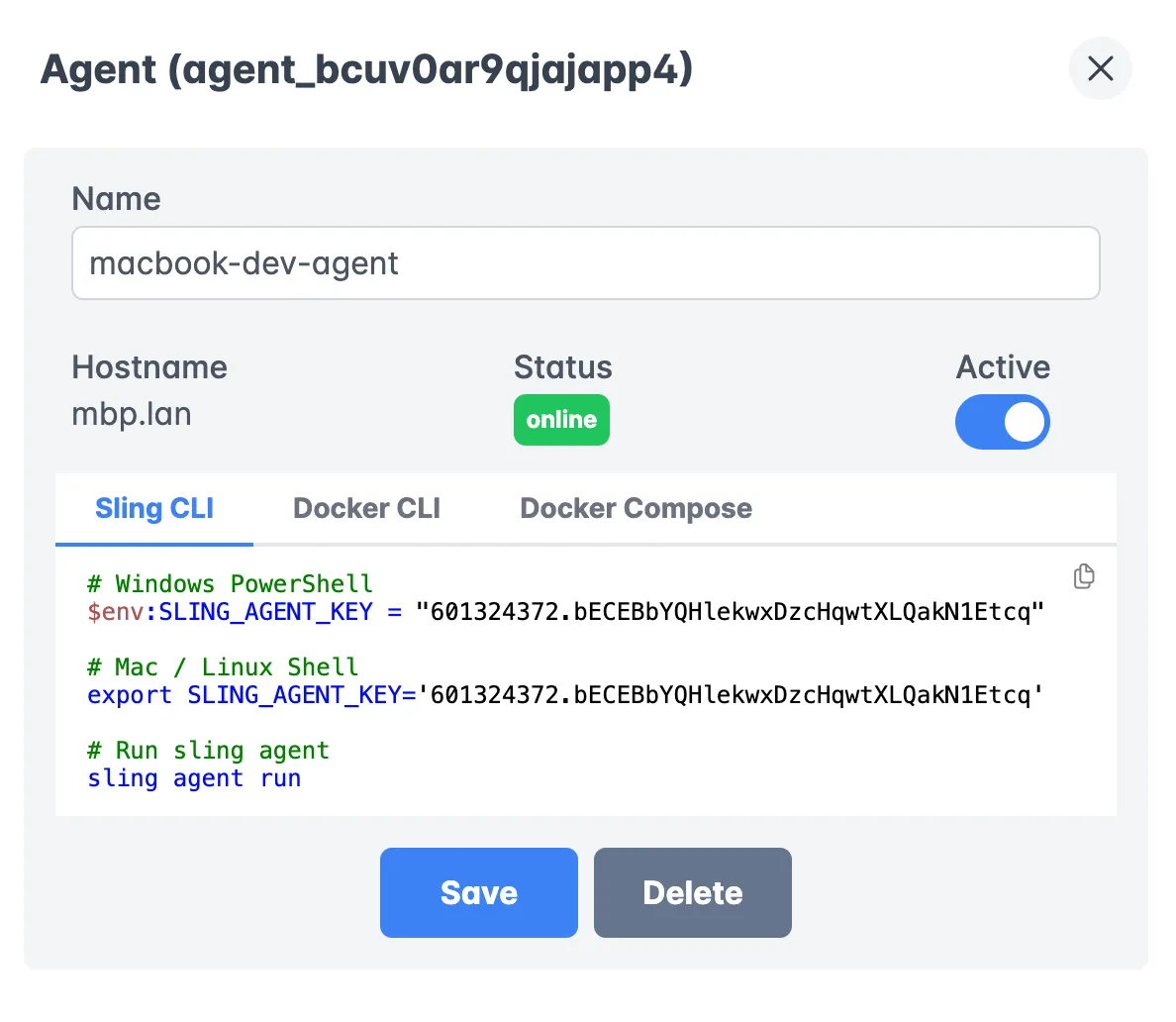
Benefits of using agents:
- Run in your own infrastructure
- Secure access to your data sources
- Automatic updates and maintenance
- Load balancing across multiple agents
- Health monitoring and auto-recovery
Connection Management
The platform provides a centralized way to manage connections:
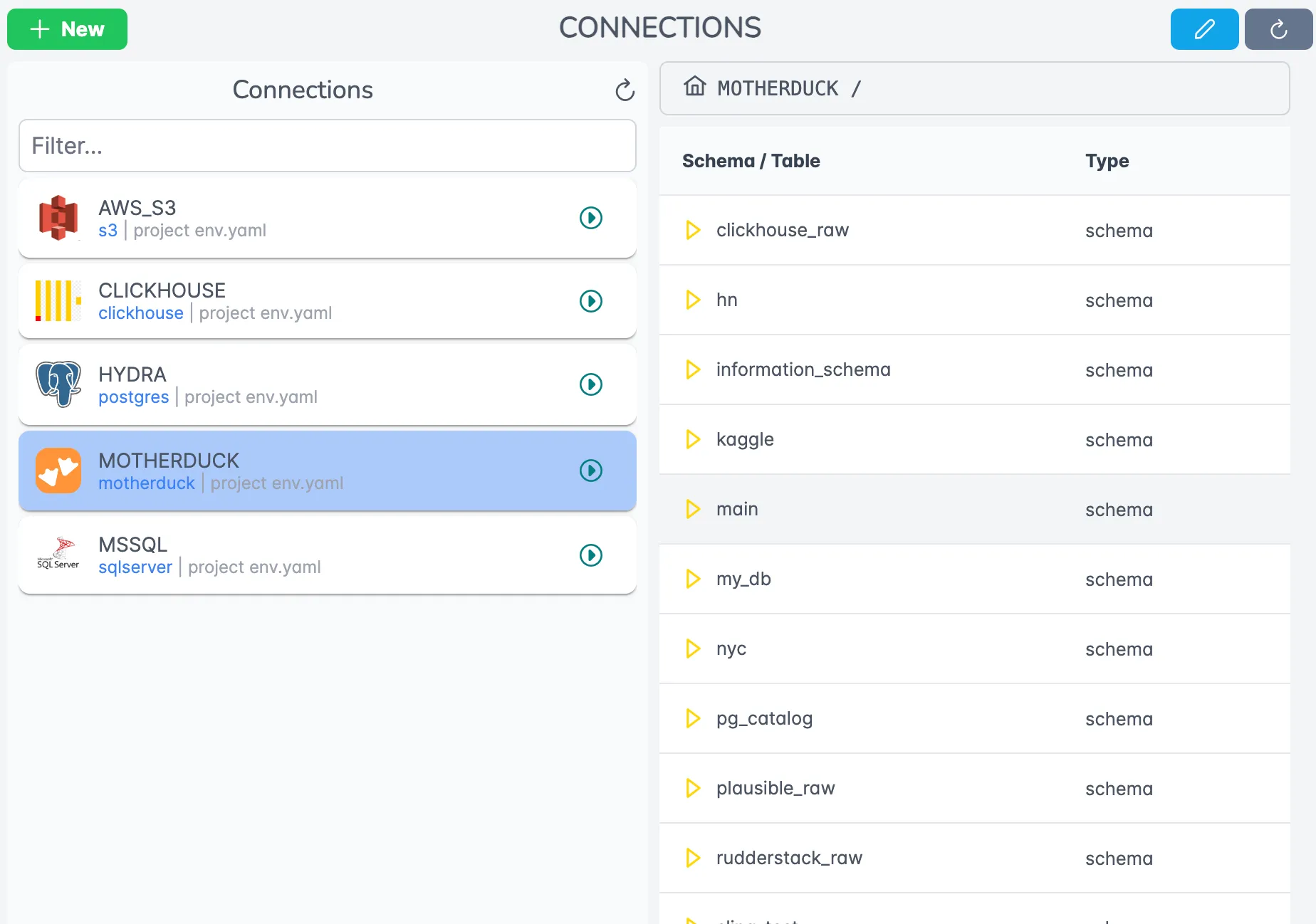
Features include:
- Secure credential storage
- Connection testing and validation
Next Steps
Now that you have your MySQL to PostgreSQL synchronization up and running, here are some ways to take your Sling usage to the next level:
Additional Resources
- Sling Documentation - Comprehensive guides and references
- Example Configurations - More replication examples
- CLI Reference - Detailed CLI command documentation
- Platform Guide - Learn more about the Sling Platform
Community and Support
Join the Sling community to get help and share experiences:
Start small with simple replications and gradually expand your usage as you become more comfortable with the platform. Sling’s flexibility means it can grow with your needs, from simple database syncs to complex data pipelines.
Related guides
For other MySQL and Postgres workflows you’ll likely need alongside this sync:
- Export MySQL to Postgres (one-shot migration)
- Export MySQL to Snowflake
- MySQL to BigQuery
- Postgres to Postgres replication
- Export MySQL to S3 (Parquet)
Frequently asked questions
What is the easiest tool for one-way MySQL to PostgreSQL sync?
For one-way, scheduled syncs, Sling is the lightest option: install the CLI, declare source and target in a YAML file, and run it on a cron or any orchestrator. There is no replication slot to manage and no daemon to keep alive. For one-shot migrations, pgloader is a strong choice too; for change-data-capture with sub-second latency, Debezium is the conventional pick.
How is this sync guide different from a one-shot MySQL to PostgreSQL migration?
A sync runs on a schedule and uses incremental mode so each run only moves rows that changed since the previous high-water mark. A one-shot migration typically runs once with full-refresh to seed the target. The configuration here is built around update_key: updated_at, which is what makes the recurring sync efficient.
Do MySQL and PostgreSQL data types map cleanly?
Most types do. INT/BIGINT, VARCHAR/TEXT, DATETIME/TIMESTAMP, DECIMAL all have direct Postgres equivalents. Two cases worth knowing about: MySQL TINYINT(1) is treated as a boolean in many drivers but lands in Postgres as SMALLINT unless you cast, and MySQL JSON columns flow into Postgres JSONB. If a mapping is wrong for your schema, override it per-column in the replication YAML under columns:.
How does Sling handle schema changes mid-sync?
With target_options.add_new_columns: true, Sling will detect new columns appearing on the source and add them to the target on the next run, keeping the sync going without manual DDL. Dropped columns and type changes are not auto-applied; those are intentionally surfaced as errors so you can decide how to handle them.
What if my MySQL tables don’t have an updated_at column?
You have a few options: add a trigger that maintains an updated_at column, use a monotonically increasing primary key as the update_key (works for append-only tables), or fall back to mode: full-refresh for that stream. Don’t try to fake incremental with a column that isn’t actually monotonic, or you’ll silently miss rows.
Can I sync only a subset of tables?
Yes. Replace the wildcard 'mysql.*' with explicit stream entries (mysql.users:, mysql.orders:), or use a more specific pattern like 'mysql.fact_*'. You can also keep the wildcard and add a disabled: true flag on individual streams you want to skip.
How often should I schedule the sync?
For most operational use cases, every 5 to 15 minutes hits a good balance between freshness and load. If your downstream consumers tolerate hourly updates, hourly is cheaper and gentler on the source. Avoid sub-minute intervals unless your update_key granularity supports it. Postgres timestamps are microsecond-precise, but MySQL DATETIME is second-precise, so collisions can drop rows on the boundary.
How is this different from logical replication or Debezium?
Logical replication and CDC tools stream every committed change as it happens. Sling polls on a schedule and re-reads rows where the update_key is newer than the last run. CDC is lower latency but requires source-side configuration (replication slots, binlog access, Debezium connectors). Sling’s polling model is simpler to operate and works against a plain read-only user, which is the right pick for analytics and warehousing workloads where seconds-of-freshness are not required.
Is Sling a good pgloader alternative?
For recurring syncs, yes. pgloader is excellent for a one-shot migration: it does the bulk load, handles MySQL-specific quirks, and exits. Sling overlaps with that use case but is designed to keep running on a schedule, with incremental updates and schema drift handling. If you need both a seed load and ongoing sync, you can use pgloader for the initial cutover and Sling for everything after, or just use Sling for both with a full-refresh first run.
Can Sling sync MySQL to MySQL, not just MySQL to Postgres?
Yes. Point the source and target at two MySQL connections and run it the same way. Because both sides are MySQL, native types round-trip cleanly, so there is no boolean or JSON re-mapping to think about. This makes MySQL to MySQL the lowest-friction sync Sling does. Use it for prod-to-dev refreshes, region-to-region snapshots, or table subsets where minutes of lag are acceptable.
When should I use native MySQL replication instead of Sling?
Use native MySQL replication (binlog-based primary/replica or Group Replication) when you need sub-second lag, automatic failover, or byte-for-byte fidelity including hard deletes. Sling polls on a schedule, so it cannot match those. Choose Sling when you need a subset of tables, scheduled snapshots for reporting, or one tool that also covers MySQL to Postgres, Snowflake, or S3.